
AI Readiness & Governance
AI Knowledge Base Governance: Keep Team Knowledge Accurate Before AI Agents Use It
AI agents and assistants are only as reliable as the knowledge they are allowed to use. Before a church, nonprofit or small business connects AI to documents, inboxes, drives, SOPs or customer records, leaders need a simple discipline for what knowledge is approved, current, permissioned and safe.
Updated September 2026. This guide is educational and operational; adapt it with legal, privacy, IT and board advisers where required.
The next AI risk is not the tool. It is the knowledge underneath it.
Many leaders first meet AI through a chatbot. The next stage is different: assistants that search files, summarize meetings, answer staff questions, draft emails from internal context, retrieve customer history, and eventually trigger workflow actions. At that point, AI is no longer responding from a blank page. It is working from your organization’s knowledge.
If that knowledge is outdated, duplicated, wrongly permissioned or mixed with private material, the AI system can confidently give the wrong answer to the right person — or the right answer to the wrong person. A policy from three years ago may override the new one. A volunteer may see a confidential note. A sales assistant may quote an old price. A ministry assistant may surface sensitive pastoral context that was never meant to become general knowledge.
Wisdom Highways’ position is clear: do not connect AI to organizational knowledge until the knowledge has an owner, a source of truth, an access rule and a review rhythm. Wisdom comes before automation because systems serve mission, people and trust.
What AI knowledge base governance means
AI knowledge base governance is the set of decisions that controls which information AI may use, who owns that information, who may access answers based on it, how often it is reviewed, and what happens when the information is wrong or sensitive.
This is not only an IT issue. It touches leadership, operations, ministry care, customer experience, HR, finance, board governance and reputation. Knowledge management has always required creating, organizing, sharing and maintaining institutional knowledge. AI raises the stakes because it can make weak knowledge appear polished, immediate and authoritative.
A useful governance model answers seven questions:
- What is the approved source of truth for this topic?
- Who is accountable for keeping it accurate?
- Who may see it, ask about it or receive AI-generated answers from it?
- What information must never be used by general AI assistants?
- How will old versions be retired or archived?
- How will staff report a wrong AI answer?
- When should AI say, “I do not know — ask a human owner”?
The Wisdom Highways four-layer model
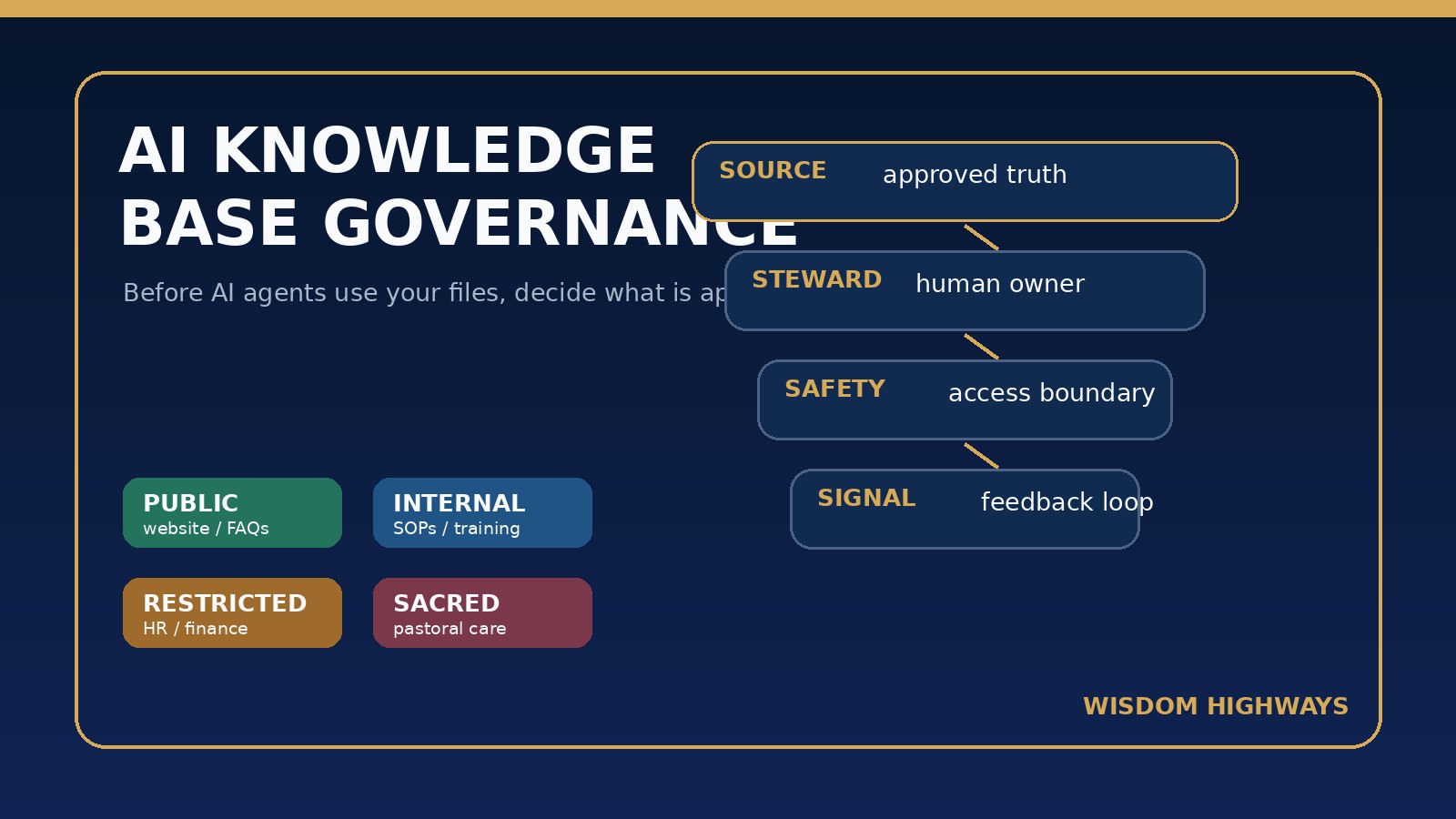
Leaders do not need a complicated framework to begin. Use four layers: Source, Steward, Safety and Signal.
1. Source: choose the approved place for truth
Every important knowledge area should have a primary home. Policies belong in a controlled policy folder or governance system. SOPs belong in an operations knowledge base. Public FAQs belong on the website or approved help center. Board decisions belong in board records. Ministry-care notes belong in protected pastoral systems, not in a general AI workspace.
When three versions of the same answer exist, AI will not automatically know which one carries authority. The leader’s job is to reduce the contradiction before automation amplifies it.
2. Steward: name the human owner
A knowledge base without ownership becomes digital clutter. Assign a role or person for each knowledge area: operations manager, administrator, pastoral lead, finance lead, HR owner, customer success lead, board secretary or founder. The steward does not need to write every document, but they must approve the current version and decide when it changes.
3. Safety: apply access and sensitivity rules
AI assistants in modern productivity suites often depend on existing permissions and tenant controls. That is helpful, but it is not enough if permissions are already messy. Before connecting AI, review who can access shared drives, HR folders, pastoral notes, finance files, recordings, old exports and customer data. If a human should not casually access a file, an AI assistant should not casually use it to answer questions.
4. Signal: measure trust through feedback
Your team needs a simple way to flag wrong, outdated or unsafe AI answers. Record the question, the answer, the source used, the correction, the owner and the date fixed. This turns AI mistakes into governance learning rather than private frustration.
A practical classification: Public, Internal, Restricted, Sacred
For churches, nonprofits and SMEs, overly technical data labels often fail. Use plain-language classes that staff and volunteers can remember.
Public knowledge
Examples include website copy, public event information, published service descriptions, public sermons or articles, general FAQs and approved marketing copy. AI can usually use this safely when the source is current and the answer is not misleading.
Internal knowledge
Examples include SOPs, staff checklists, internal templates, training notes, approved scripts, standard workflows and operational playbooks. AI can use this for the right staff, but it should not leak externally or override a human decision in high-consequence matters.
Restricted knowledge
Examples include finances, HR, vendor contracts, donor details, customer records, board papers, incident logs and legal-sensitive material. AI use should be role-limited, logged where practical, and reviewed before the output affects people, money or commitments.
Sacred knowledge
For ministries and faith-aligned organizations, some information deserves stronger language than “restricted.” Prayer requests, counselling context, safeguarding matters, confessions, family crises, pastoral-care notes and vulnerable-person details should not be placed in a general AI knowledge base. If technology is used at all, it must be governed by pastoral wisdom, consent, confidentiality, safeguarding practice and local obligations.
For pastors and ministry teams: protect people before speeding up answers
A church may want AI to answer common staff questions: “What is our baptism process?” “How do volunteers request reimbursements?” “What is the children’s ministry check-in procedure?” Those are excellent candidates for an approved internal knowledge base.
But ministry teams must draw boundaries. AI should not become a searchable memory of counselling conversations, member crises, children’s issues or private pastoral care. A fast answer that violates trust is not a productivity win.
- Use AI for public service information, training checklists and administrative SOPs.
- Keep pastoral-care information outside general assistants unless a specific protected system and policy exists.
- Separate volunteer-friendly knowledge from staff-only or elder/board-only knowledge.
- Review theological, discipleship and counselling content before AI summarizes or teaches from it.
- Train staff to ask, “Should this be knowledge for the system, or confidential care for a person?”
For SMEs and nonprofits: stop outdated knowledge from becoming automated misinformation
Small teams often carry institutional memory in scattered places: WhatsApp threads, old proposals, staff laptops, shared drives, CRM notes, Notion pages, Google Docs, Word files, meeting transcripts and email attachments. AI can make that mess feel searchable, but searchability is not the same as truth.
Before deploying an internal AI assistant, choose the top ten knowledge areas that most affect trust: pricing, onboarding, refund or cancellation rules, client deliverables, HR policies, escalation paths, service promises, donor communications, finance approvals and customer-support responses.
For each area, identify the approved answer, archive old versions, limit access and assign a steward. A simple cleanup can prevent expensive confusion later.
The AI knowledge base governance checklist
- Inventory the knowledge sources. List drives, wikis, SOP folders, CRMs, inboxes, recordings, policy documents, chat exports and meeting summaries.
- Pick the source of truth for each major topic. If there are duplicates, label one current and archive the rest.
- Assign a steward. Every knowledge area should have a human owner who can approve, retire or correct content.
- Classify the knowledge. Use Public, Internal, Restricted and Sacred so non-technical teams understand the boundary.
- Review permissions before connecting AI. Do not rely on AI to fix messy access control.
- Create an “AI may use” folder or collection. Start with approved material rather than letting AI search everything.
- Mark expiry and review dates. Policies, prices, SOPs and scripts should not live forever without review.
- Teach the assistant refusal rules. AI should decline or escalate when a question involves sensitive care, legal issues, HR discipline, finances, safeguarding or uncertainty.
- Log wrong answers. Treat corrections as knowledge-base maintenance, not user annoyance.
- Review monthly at first. Early AI knowledge systems reveal hidden disorder quickly; use that insight to strengthen operations.
A 30-day implementation plan
Week 1: map and classify
List the repositories your team already uses. Mark each as Public, Internal, Restricted or Sacred. Identify obvious duplicates and old versions.
Week 2: select the first safe knowledge set
Choose one high-value, low-risk area such as staff onboarding, event operations, service FAQs, volunteer scheduling or customer-support SOPs. Create a clean “AI may use” collection.
Week 3: test with real questions
Ask the questions staff actually ask. Check whether answers cite the right source, avoid old information, stay within permissions and escalate when unsure.
Week 4: publish rules and feedback path
Tell the team what AI can answer, what it cannot answer, how to report a wrong answer and who owns updates. This turns AI from a novelty into a governed system.
Common mistakes to avoid
- Connecting AI to everything at once. Start with a clean, approved knowledge set.
- Assuming permissions are correct. AI will often reflect existing access problems.
- Letting old files compete with approved policies. Archive or label outdated versions clearly.
- No human owner. If nobody owns the answer, nobody owns the correction.
- Using AI for sacred or sensitive care without boundaries. Trust is not worth sacrificing for convenience.
- No feedback loop. A wrong answer should improve the system, not disappear into a complaint.
Before AI agents use your knowledge, assess your readiness
If your organization wants AI assistants, automation or agents, the first question is not “Which tool should we buy?” It is “Is our knowledge accurate, governed and safe enough for a tool to use?”
Related Wisdom Highways resources
- AI Access Control Checklist: Who Should Be Allowed to Use Which Tools?
- AI Data Retention Policy: How Long Should Leaders Keep Prompts, Outputs and Transcripts?
- AI Tool Inventory Template: Know What Your Team Is Using Before Risk Spreads
- AI Output Review Checklist Before Sending AI-Written Content
- AI Governance Checklist for Churches and Small Businesses
- What Is an AI Agent? A Simple Guide for Non-Technical Leaders
Sources and further reading
- NIST AI Risk Management Framework: AI risk management includes govern, map, measure and manage functions across the system lifecycle.
- CISA Secure by Design: security should be built into technology and operational practices rather than added after problems occur.
- Microsoft 365 Copilot privacy and security documentation: AI assistants depend on organizational data, permissions and tenant controls.
- Google Workspace Gemini for Workspace documentation: administrators need to understand data protection, access and account-level controls for AI-enabled work.
- IBM overview of knowledge management: organizations need processes for creating, sharing, using and managing knowledge.
- Atlassian knowledge base overview: useful knowledge bases require accessible, organized, maintained information rather than scattered answers.
Keep learning with Wisdom Highways. Follow our WhatsApp Channel for practical AI tips, time-saving ideas, product updates and selected offers.
Follow WH Premium AI Vault on WhatsApp