
AI Readiness & Governance
AI Data Retention Policy: How Long Should Leaders Keep Prompts, Outputs and Transcripts?
AI tools make it easy to create transcripts, summaries, drafts, prompts and decision notes. Wise leaders decide what should be kept, what should be deleted, who may access it and when human review is required — before the archive becomes a risk.
Updated September 2026. This guide is educational and not legal advice; adapt it with your legal, compliance or board advisers where required.
The hidden problem: AI creates more records than leaders notice
Many churches, nonprofits and small businesses introduce AI one helpful feature at a time: a meeting assistant here, a chatbot there, a shared prompt library, an automated draft, a call summary or a board-paper outline. The visible benefit is speed. The less visible consequence is a growing trail of prompts, transcripts, summaries, files, personal details, ministry-care notes, client context and internal decisions.
If nobody owns retention, the organization slowly accumulates information it may not need, cannot easily review and may not be able to explain later. A transcript of a pastoral care conversation, a donor discussion, a staff issue, a customer complaint or a strategy meeting is not just “notes.” It may contain personal data, confidential plans, sensitive spiritual or relational context, commercial information or legal risk.
Wisdom Highways’ position is simple: automation should never create an unmanaged memory of your organization. Keep what serves mission, accountability and lawful operations. Delete what increases exposure without adding value. Review sensitive AI output before it becomes part of the official record.
What an AI data retention policy should cover
An AI data retention policy is a practical rule set for how long your organization keeps AI-related records and how those records are reviewed, stored, accessed and deleted. It should not be a 40-page document that nobody reads. It should answer the daily questions your team actually faces:
- May staff paste personal, member, donor, client or employee information into AI tools?
- Are AI prompts and outputs treated as official records, drafts or disposable working notes?
- How long do you keep meeting transcripts, call summaries and AI-generated action lists?
- Who can access AI-created notes after a meeting ends?
- Which conversations should never be recorded or transcribed by default?
- When must a human approve an AI summary before it is shared or filed?
- Who is responsible for deletion, export, audit and exception handling?
Good retention is not only about deleting data. It is about matching the life of a record to its purpose.
The Wisdom Highways retention principle: keep by purpose, not by convenience
Convenience says, “Storage is cheap; keep everything.” Wisdom says, “Trust is expensive; keep only what we can justify.”
A purpose-led retention decision asks four questions:
- Why was this AI record created? Drafting, meeting memory, compliance, ministry care, customer support, board accountability, training or experimentation?
- Who could be affected if it is wrong, leaked, misread or kept too long? Members, staff, clients, donors, volunteers, children, vulnerable people, partners or the organization itself?
- What value remains after the immediate task is complete? A final approved policy may need to be kept; raw prompts used to draft it may not.
- What rule will trigger review or deletion? Time period, project closure, case closure, approval of final version, staff exit, tool migration or board decision?
This aligns with widely recognized governance ideas: NIST frames AI risk management as a lifecycle discipline; privacy regulators emphasize accountability and data protection; GDPR principles include data minimisation and storage limitation; enterprise systems such as Microsoft Purview and Google Vault exist because records need rules, not wishes.
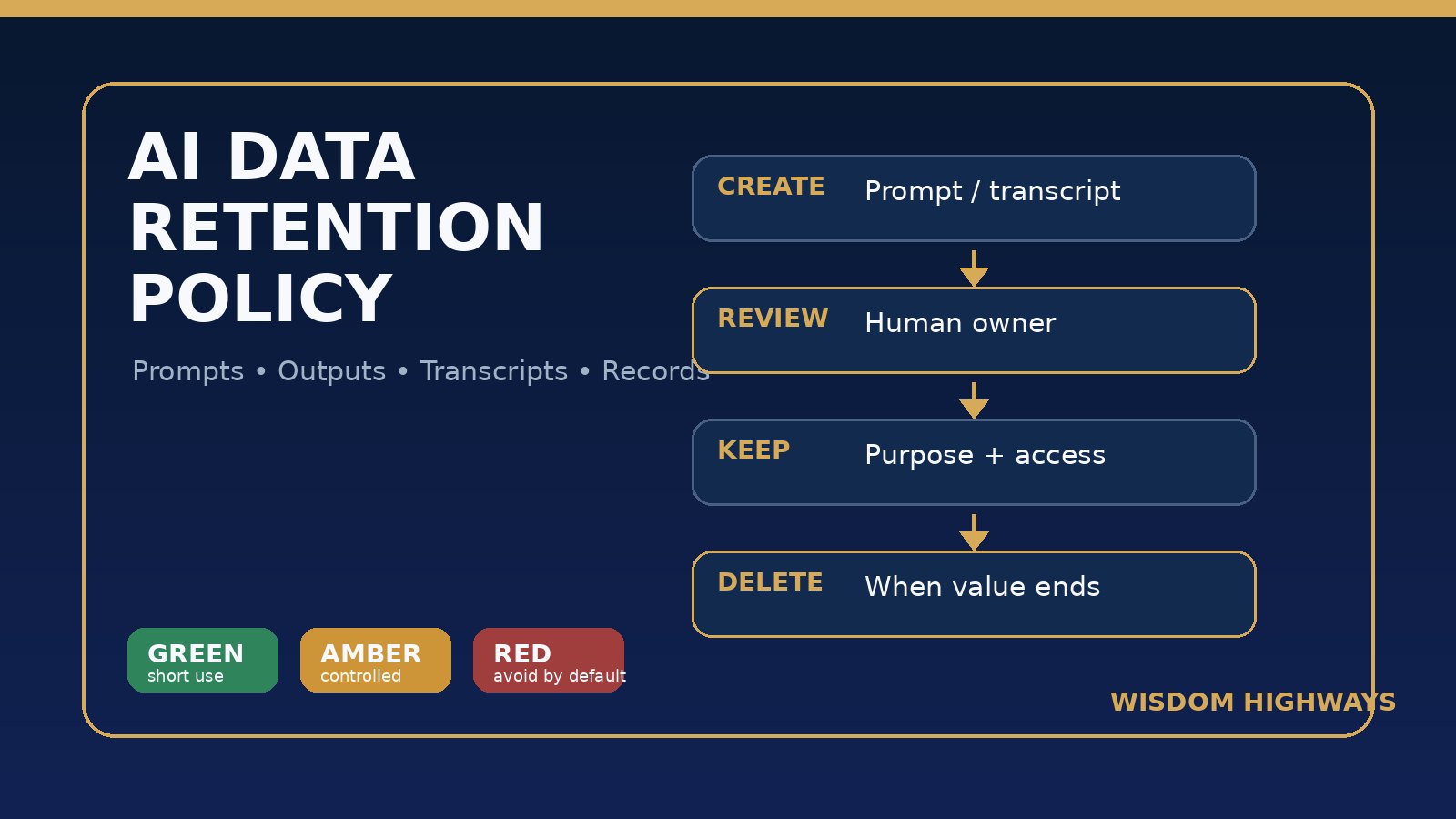
A practical retention model: Green, Amber and Red AI records
Leaders need a model simple enough for real teams. Use three classes.
Green records: low sensitivity, short operational value
Examples: brainstorming prompts, generic social captions, simple task lists, non-sensitive meeting agendas, public-information summaries and early internal drafts that do not contain private data.
Suggested rule: keep only while useful for the current task or project. Delete or archive within 30–90 days unless moved into an approved final document. Do not treat every AI draft as permanent knowledge.
Amber records: useful but sensitive enough to govern
Examples: customer-service summaries, staff-planning notes, donor or volunteer coordination, internal process recommendations, board-prep outlines, ministry program evaluations and prompts that include limited operational context.
Suggested rule: keep under a named owner for a defined period such as 6–24 months, depending on your sector and local obligations. Require human review before sharing widely. Restrict access to people who need the record for their role.
Red records: high sensitivity or high consequence
Examples: pastoral counselling notes, safeguarding issues, disciplinary matters, HR disputes, legal strategy, medical details, children’s information, confidential mergers or acquisitions, financial hardship, serious complaints and any transcript that captures deeply personal conversation.
Suggested rule: do not record or transcribe by default. If a record must exist, define the lawful or governance reason, human owner, access controls, retention period, deletion process and escalation path before the AI tool is used.
For churches and ministries: protect care before convenience
Church leaders often adopt tools to reduce administrative pressure. That is understandable. But the most sensitive ministry information is rarely labelled as “data” in daily language. It appears as prayer requests, counselling context, giving hardship, family crises, volunteer concerns, testimonies, pastoral visits and safeguarding conversations.
A church AI retention policy should make these boundaries explicit:
- Prayer, counselling and pastoral-care conversations should not be transcribed by default.
- Children, vulnerable adults and safeguarding matters require special caution and local policy alignment.
- AI summaries of pastoral or disciplinary matters should never become official records without human review.
- Volunteers should not store ministry-sensitive AI notes in personal accounts.
- Public testimonies should not be repurposed through AI without permission and context.
Technology can support ministry administration, but trust is a spiritual and relational asset. Once breached, it is difficult to rebuild.
For SMEs and nonprofits: stop AI clutter from becoming operational risk
Small organizations often lack a legal department, records manager or dedicated data protection officer. That makes simple operating rules even more important. Without them, AI records scatter across personal accounts, shared drives, meeting apps, chat tools and project-management boards.
Start with the highest-risk workflows: sales calls, HR conversations, customer complaints, finance meetings, board discussions, donor relations and client strategy. Decide what is official, what is draft, what must be reviewed and what should disappear after the job is done.
A helpful SME rule is: if you would not want the raw note read out of context in a dispute, do not keep it casually. Either convert it into an approved record with context and ownership, or delete it according to policy.
The AI retention checklist for leaders
- Map the AI record types. List prompts, outputs, transcripts, summaries, uploaded files, chat histories, images, voice notes, meeting recordings and automated decisions.
- Classify them by sensitivity. Use Green, Amber and Red. Do not let everything default to Green.
- Name a record owner. Every retained AI record should belong to a person or role, not a forgotten tool account.
- Define the retention period. Use purpose-based periods: task completion, project closure, fiscal year, legal requirement, board approval or case closure.
- Separate drafts from official records. AI output should not become official simply because it was generated.
- Set human review gates. Require review before filing summaries, sending AI-written communication or using AI notes for decisions affecting people.
- Restrict access. Meeting transcripts and sensitive prompts should not be open to the whole team by default.
- Use tool-level settings. Review retention, training, sharing and deletion settings in your AI, meeting and productivity platforms.
- Create a deletion rhythm. Monthly or quarterly cleanup is better than a policy nobody enforces.
- Record exceptions. If you keep something longer than normal, note why, who approved it and when it will be reviewed again.
A simple starter policy your team can adapt
Use this as a starting point, not a substitute for legal advice:
AI records are retained only when they serve a clear operational, ministry, legal, accountability or learning purpose. Raw prompts, draft outputs and meeting transcripts are not official records unless reviewed and approved by an accountable human owner. Sensitive conversations are not recorded or transcribed by default. AI records are classified as Green, Amber or Red, stored only in approved systems, accessed only by appropriate roles and deleted according to the retention period assigned to their purpose and sensitivity.
Then add a table with your organization’s exact retention periods. For example:
- Generic brainstorming prompts: delete within 30 days.
- Approved AI-assisted policies or SOPs: retain while active plus prior-version archive.
- Meeting action summaries: keep until actions close, then archive or delete based on meeting type.
- Board-approved minutes: retain according to governance requirements, not as raw AI transcripts.
- Pastoral-care AI notes: avoid by default; if unavoidable, handle under pastoral/safeguarding policy.
- HR or legal AI records: retain only under approved HR/legal process.
Common mistakes to avoid
- Keeping every transcript forever. More records do not always mean more accountability; sometimes they mean more confusion and exposure.
- Letting personal accounts become archives. Organization knowledge should not live in unmanaged staff AI accounts.
- Confusing AI confidence with truth. A polished summary can still be incomplete or wrong.
- Ignoring tool settings. Different platforms handle storage, training, sharing and deletion differently.
- Not telling people when AI is used. Notice and consent expectations vary by context and jurisdiction; leaders should not surprise people with invisible recording or processing.
- No deletion owner. A retention policy without an owner becomes a document, not a discipline.
How to implement this in seven days
- Day 1: List where AI records currently appear — meeting tools, chatbots, shared drives, email, CRM, helpdesk and staff devices.
- Day 2: Identify Red workflows where recording or transcription should stop until reviewed.
- Day 3: Create the Green/Amber/Red classification table.
- Day 4: Assign owners for meeting summaries, prompt libraries, client records, ministry-care notes and policy drafts.
- Day 5: Review platform settings for retention, training, sharing and deletion.
- Day 6: Communicate the policy in plain language to staff and volunteers.
- Day 7: Schedule the first cleanup and exception review.
Before AI records multiply, assess your readiness
If your organization is already using AI tools but has no clear rules for prompts, outputs, transcripts, access and deletion, this is a readiness issue — not just an IT issue.
Related Wisdom Highways resources
- AI Meeting Notes Policy: What Leaders Should Record, Review and Never Transcribe
- AI Data Privacy Checklist Before Using ChatGPT or Similar Tools
- AI Access Control Checklist: Who Should Be Allowed to Use Which Tools?
- AI Audit Trail: What Leaders Should Record When AI Supports Decisions
- Shadow AI Governance Checklist for Leaders
Sources and further reading
- NIST AI Risk Management Framework: governance, mapping, measuring and managing AI risks over the lifecycle.
- UK ICO AI guidance: accountability, privacy and data protection considerations for AI systems.
- GDPR Article 5: data minimisation, storage limitation, integrity and confidentiality principles.
- Microsoft Purview retention guidance: practical retention and deletion concepts in modern workplace systems.
- Google Vault retention rules: example of how organizations govern retention and deletion across communications records.
- Zoom AI Companion data handling documentation: tool-specific review before retaining AI-generated meeting content.
Keep learning with Wisdom Highways. Follow our WhatsApp Channel for practical AI tips, time-saving ideas, product updates and selected offers.
Follow WH Premium AI Vault on WhatsApp