
AI Readiness & Data Governance
AI Data Classification for Leaders: What Teams Can Share, Restrict or Never Paste
Most AI mistakes do not begin with bad intentions. They begin when a busy person pastes the wrong information into the wrong tool because no one gave the team a simple data classification rule.
Updated September 2026. This article is educational and operational, not legal, privacy, cybersecurity or employment advice. Adapt it with qualified advisers for your country, sector and risk level.
Why data classification matters before AI adoption scales
AI tools make information feel frictionless. A staff member can paste meeting notes, a donor email, a customer complaint, a sermon outline, a spreadsheet, a policy draft or a client message and receive a polished answer in seconds. That speed is useful, but it can also make people forget that not all information carries the same level of risk.
For churches, nonprofits, SMEs and purpose-driven organizations, the problem is rarely that leaders want careless AI use. The problem is that teams are moving faster than policy. People need a plain-language way to know what is safe to use, what needs approval, and what should never enter a public or unmanaged AI tool.
Wisdom Highways teaches wisdom before automation. Data classification is one way wisdom becomes practical. It protects people, trust, mission, reputation and operational continuity before automation touches sensitive information.
Search intent: what leaders need when they look for this topic
Someone searching for AI data classification is usually trying to answer a practical question: “What can our team safely paste into ChatGPT, Copilot, Gemini or another AI tool?” They may not need a complex enterprise taxonomy. They need a simple decision model that pastors, ministry administrators, nonprofit managers, sales teams, assistants and operations staff can remember under pressure.
This guide gives leaders a usable starting framework. It does not replace legal or security review, but it helps organizations stop treating every piece of information as either completely safe or completely forbidden.
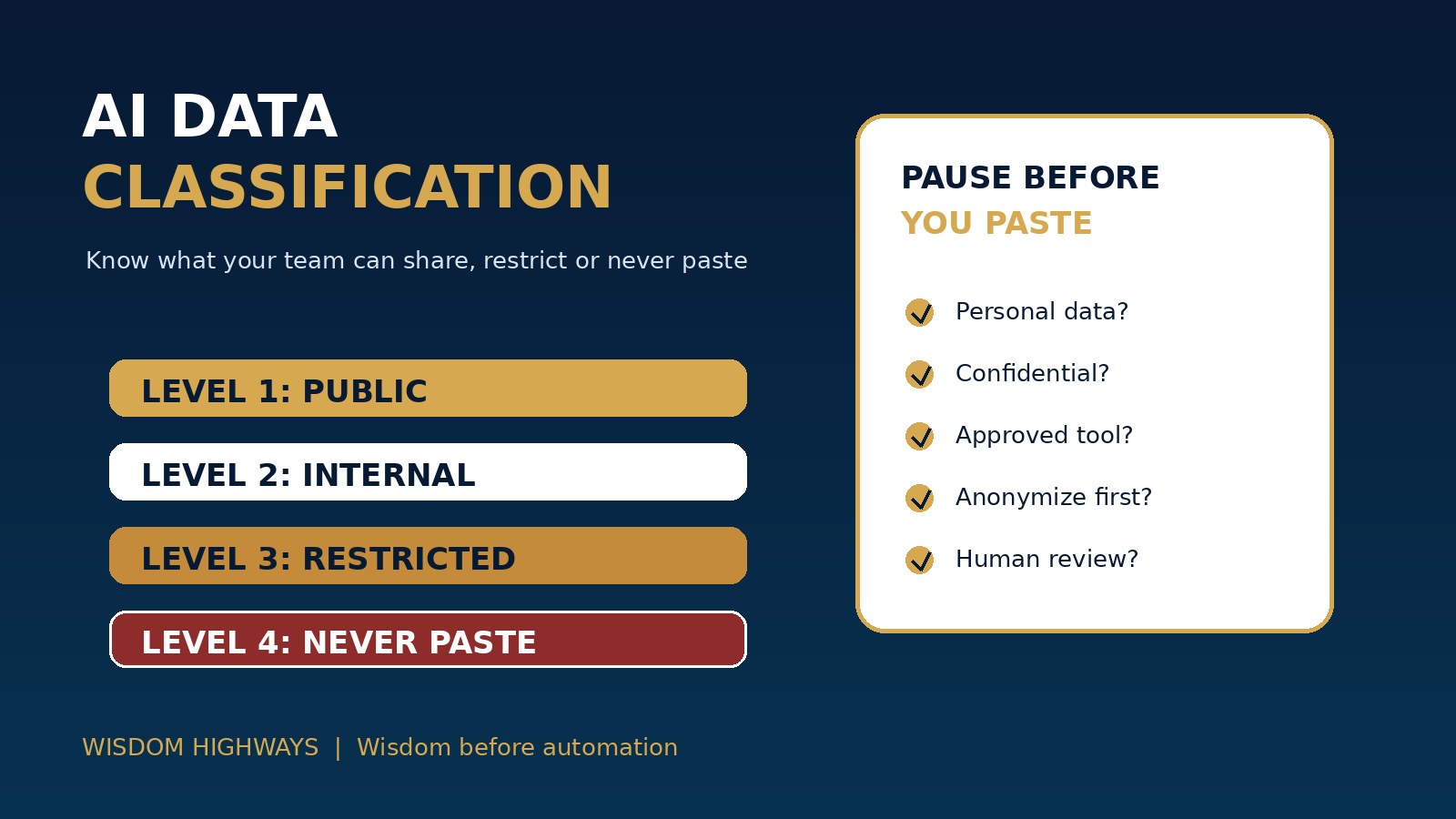
The Wisdom Highways four-level AI data classification model
Level 1: Public information — generally safe with normal judgment
Public information is already intended for broad visibility: published website copy, public event details, public service times, publicly released product descriptions, approved biographies, general educational notes and non-sensitive marketing drafts.
Teams may usually use public information in AI tools for summarizing, reformatting, brainstorming or improving clarity. Even here, they should still review outputs for accuracy, tone, brand fit and unintended claims.
Level 2: Internal working information — use with caution and context limits
Internal working information includes draft plans, internal process notes, non-confidential meeting summaries, anonymized workflow examples, general SOP drafts, training outlines and operational checklists. It may not be secret, but it was not created for public release.
This level can often be used in approved AI tools when sensitive details are removed and the workflow has a human review step. Leaders should ask whether the same result can be achieved with anonymized or simplified context.
Level 3: Restricted information — use only in approved protected systems
Restricted information includes personal data, donor or customer details, staff records, financial information, contracts, unpublished board materials, pastoral-care context, beneficiary stories, private strategy documents, credentials, vendor keys and regulated information.
This information should not be pasted into public or unmanaged AI tools. If AI support is needed, use only an approved environment with appropriate controls, permissions, retention settings, contracts and review.
Level 4: Never-paste information — do not enter into AI tools unless formally authorized
Never-paste information includes passwords, API keys, private tokens, payment-card data, highly sensitive pastoral or counselling conversations, medical or legal files, protected children’s information, confidential HR investigations, unresolved disciplinary matters, private confessions, sensitive national identifiers and any information your policy, law or covenantal responsibility says must not be shared.
For ministry contexts, this category matters deeply. Pastoral trust is not merely a data category; it is a sacred responsibility. If the information was entrusted to a leader in confidence, do not treat a general AI tool as a private adviser.
A quick decision test before anyone pastes information into AI
- Would we be comfortable if this exact information appeared in the wrong account?
- Does it identify a person, donor, client, member, child, employee or vulnerable beneficiary?
- Does it contain confidential strategy, finances, credentials, contracts or disputes?
- Is the tool approved for this type of data?
- Do we know whether the vendor stores, trains on or shares inputs?
- Can the task be done with anonymized, fictional or summarized information instead?
- Who reviews the output before it affects a person or decision?
If the answer is unclear, pause. A short pause before pasting can prevent a long recovery process later.
Examples for churches, nonprofits and SMEs
Church or ministry: A public announcement about a youth event may be Level 1. A volunteer rota may be Level 2 if names are removed. A pastoral-care note is Level 3 or Level 4 depending on sensitivity and should not enter a general AI tool. A child-protection incident report should be treated as never-paste unless handled through formally approved protected systems and advisers.
Nonprofit: A public campaign description may be Level 1. A draft grant outline with no personal data may be Level 2. Beneficiary case notes, donor records and private board financials are restricted or never-paste depending on detail and jurisdiction.
SME: A public product description may be Level 1. A generic SOP draft may be Level 2. Customer complaints, employee records, sales pipelines, contracts and passwords belong in restricted or never-paste categories.
How to implement this in seven days
- List the tools in use. Start with the AI tool inventory; include unofficial tools staff may already use.
- Name common data types. Include emails, spreadsheets, meeting notes, donor records, customer records, sermon notes, contracts, finance, HR and credentials.
- Assign each data type to a level. Keep the language simple enough for volunteers and new staff.
- Publish a one-page rule. Do not bury the policy in a long document no one reads.
- Configure access. Use approved tools, admin controls, role-based access and account removal practices.
- Train with examples. Give people scenarios they actually face, not abstract warnings.
- Review exceptions monthly. Update the classification when new tools, workflows or risks appear.
Common mistakes to avoid
- Telling people “be careful” without defining careful.
- Assuming staff understand vendor data-use terms.
- Letting convenience override confidentiality.
- Putting all AI tools in one category instead of checking the specific environment.
- Failing to anonymize examples before prompting.
- Allowing volunteers or contractors to use personal AI accounts for organizational work.
- Creating a policy but never connecting it to access controls, training and review.
Leadership scorecard: are we ready to classify AI data?
| Readiness area | Question | Status |
|---|---|---|
| Tool visibility | Do we know which AI tools our team uses? | Not started / In progress / Ready |
| Data categories | Have we named public, internal, restricted and never-paste information? | Not started / In progress / Ready |
| Approved tools | Do staff know which tools are approved for each data level? | Not started / In progress / Ready |
| Human review | Do sensitive outputs require human review before action? | Not started / In progress / Ready |
| Training | Have staff and volunteers seen real examples? | Not started / In progress / Ready |
| Exception process | Do people know what to do if the wrong data is pasted? | Not started / In progress / Ready |
Evidence and governance anchors
The sources below support the article’s cautious approach to AI governance, privacy, security, risk management and responsible data handling. They should guide leadership questions, not replace local professional advice.
- NIST AI Risk Management Framework — supports mapping, measuring and managing AI risks instead of treating tool use as a one-time approval.
- OECD AI Principles — anchors human-centred, transparent, robust and accountable AI use.
- CISA Secure by Design — reinforces reducing risk through secure design and responsible operation.
- UK ICO AI and data protection guidance — supports accountability, transparency and privacy discipline when AI involves personal data.
- OWASP Top 10 for Large Language Model Applications — highlights LLM risks such as sensitive information disclosure and insecure outputs.
- EU AI Act Explorer — provides a public reference point for risk-based AI obligations affecting some organizations and vendors.
Related Wisdom Highways resources
Before your team pastes the next file
AI can help your organization work faster, but speed without classification creates avoidable risk. A simple four-level data rule gives your team confidence: this can be shared, this needs caution, this requires an approved protected system, and this must never be pasted.
Keep learning with Wisdom Highways. Follow our WhatsApp Channel for practical AI tips, time-saving ideas, product updates and selected offers.
Follow WH Premium AI Vault on WhatsApp