
AI Readiness · Staff Training · Leadership Systems
AI Staff Training Plan: What Leaders Should Teach Before the Team Uses AI Tools
AI adoption usually does not fail because a tool is too advanced. It fails because people are asked to use powerful tools without shared judgment, clear boundaries or a simple training rhythm.
For a pastor, nonprofit director, founder or SME leader, the question is not only “Which AI tool should we buy?” The wiser first question is: What must our people understand before we put AI into everyday work?
This guide gives you a practical, non-technical AI staff training plan you can adapt for employees, ministry staff, volunteers, contractors and leadership teams. The goal is not to turn everyone into technologists. The goal is to help people use AI with wisdom, safety, accountability and mission alignment.
Why AI training must come before scale
Many organizations introduce AI informally. A staff member uses ChatGPT to draft a newsletter. A volunteer creates social captions. A department experiments with a meeting-summary tool. A manager signs up for a new copilot because it promises productivity. None of this may be malicious. Most of it begins with a desire to save time.
But without training, helpful experimentation can turn into shadow AI: tools being used without clear approval, data boundaries, human review or accountability. That is where reputational, pastoral, donor, customer and operational risks begin to grow quietly.
Training is not a box-checking exercise. It is leadership discipleship for a new kind of work environment. People need to know what AI is good at, where it is weak, what they may never paste into public tools, when human review is required, how to disclose or document use, and how to escalate concerns.
For Wisdom Highways, the principle is simple: wisdom before automation. Tools can accelerate output, but trained people protect mission, trust and people while the tools are being used.
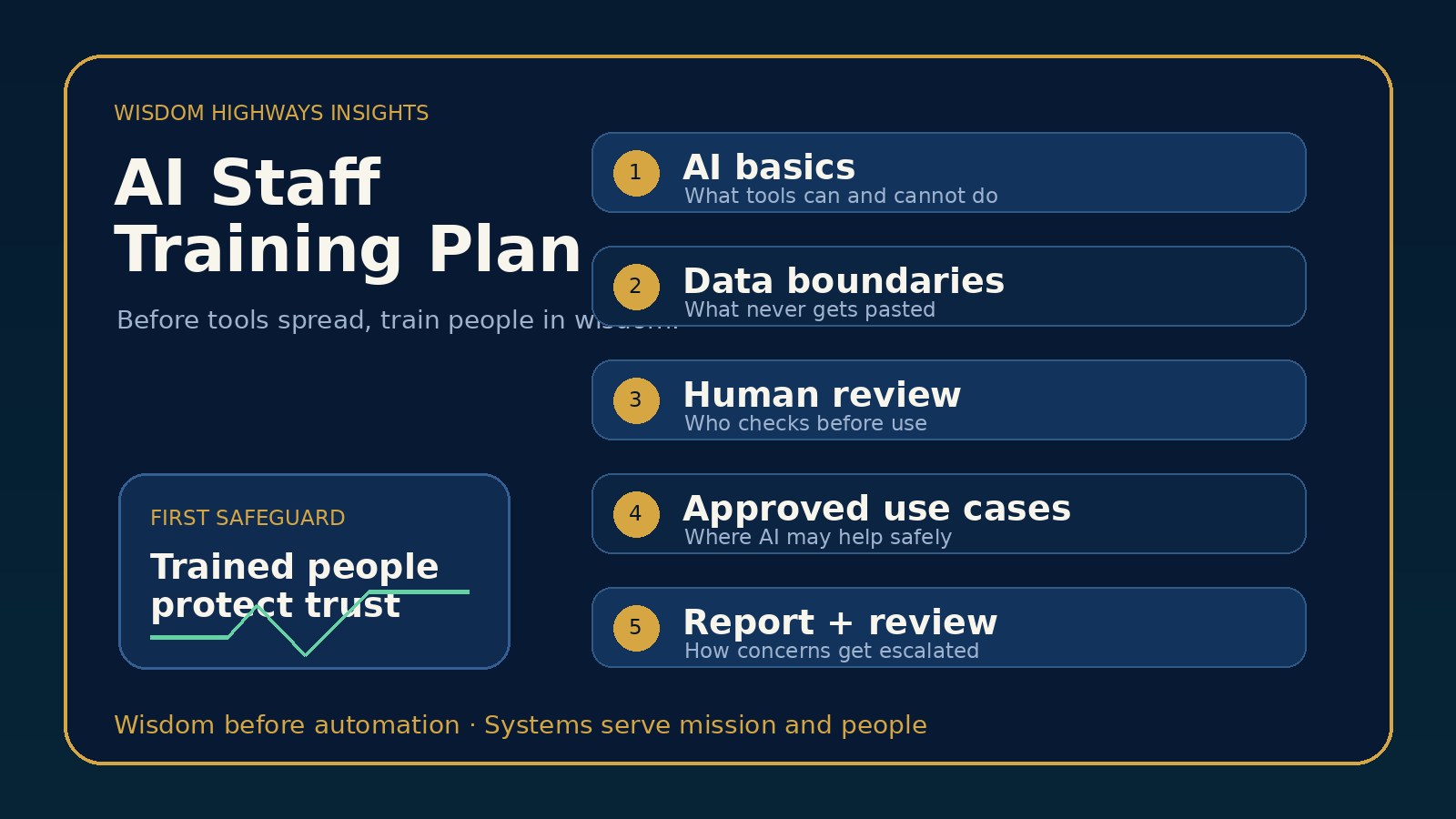
The Wisdom Highways 5-part AI staff training model
A good AI training plan for a small or purpose-driven organization does not need to be long. It needs to be clear, repeated and connected to real work. Start with five modules.
1. AI basics in plain language
Begin by explaining what the organization means by AI. For most teams, this includes generative AI tools that write, summarize, plan, analyze, design, translate or answer questions; automation tools that move information between systems; and emerging AI agents that can complete multi-step tasks when connected to apps.
Keep the explanation practical. AI can produce useful drafts, patterns and suggestions. It can also produce false information, outdated answers, confident mistakes and tone that does not fit your audience. Staff should understand that AI output is not automatically truth, strategy, theology, legal advice, pastoral care or approved brand voice.
2. Data boundaries: what must not be entered
This is the most urgent training section for many organizations. Every team member should know what information is prohibited, restricted or approved for AI tools. Churches and ministries should be especially careful with pastoral-care notes, prayer requests, counselling details, children’s information, member records and confidential leadership matters. Nonprofits should protect donor details, beneficiary information, grant records and impact data that has not been verified. Businesses should protect customer data, financial information, HR matters, contracts, passwords and proprietary strategy.
A simple rule helps: if the information would be harmful, embarrassing, unlawful or trust-breaking if exposed or misused, do not paste it into an unapproved AI tool. If the team needs AI for sensitive information, that requires a governed system, approved vendors, privacy review and role-based access — not casual experimentation.
3. Human review and accountability
AI can assist work, but people remain accountable for what leaves the organization. Staff should know which outputs require human review before use: public communication, donor updates, sermons and teaching materials, customer replies, HR decisions, financial analysis, legal-sensitive wording, medical or counselling-adjacent content, policies, strategy documents and anything that affects real people.
Review should not be vague. Name the owner. Define what they check: facts, tone, sources, data use, audience impact, theological or values alignment, legal sensitivity, and whether the output promises more than the organization can deliver.
4. Approved use cases and prohibited use cases
Training becomes clearer when leaders give examples. Approved use cases might include first drafts of internal agendas, brainstorming non-sensitive content ideas, summarizing public articles, rewriting approved copy for clarity, creating checklists, or organizing meeting notes where no confidential data is included. Prohibited use cases might include uploading member lists, generating pastoral advice for a specific person, making employment decisions, producing final legal language, impersonating leaders, or creating public claims from unverified information.
This is where leaders should connect training to the organization’s AI policy, data privacy checklist and risk register.
5. Reporting, review and continuous learning
AI training is not one meeting forever. Tools change, vendors change, regulations change, and staff habits change. Every training plan should include a simple way to report concerns, request approval for a new tool, log incidents, and review approved workflows after launch.
A small team can start with a shared form or internal email route: “Request AI tool approval,” “Report AI concern,” and “Submit AI use-case idea.” What matters is that experimentation becomes visible enough for leaders to guide it wisely.
What different roles need to know
Not everyone needs the same depth of training. A tiered model helps leaders avoid overwhelming the team while still protecting the organization.
| Role | Training focus | Example requirement |
|---|---|---|
| All staff and regular volunteers | AI basics, data boundaries, prohibited uses, human review | Complete a short orientation before using AI for work |
| Communications and admin teams | Fact-checking, tone, brand voice, public claims, privacy | Use AI for drafts only; human approval before publishing |
| Pastoral, care, donor or customer-facing teams | Sensitive data, trust, escalation, empathy, accountability | Never enter confidential personal details into public AI tools |
| Managers and ministry/business leaders | Use-case approval, risk scoring, review cadence, vendor questions | Approve workflows before team-wide use |
| Technical or operations owners | Access control, integrations, logs, vendor settings, incident response | Document tools, owners, data flows and review dates |
This tiered approach is especially helpful for churches and nonprofits where volunteers may help with communication, media, administration or community care but may not have formal technology training. The training should be accessible, respectful and clear.
Examples for churches, nonprofits and small businesses
Church or ministry example
A church wants staff and volunteers to use AI for announcement drafts, event descriptions and volunteer reminders. Training should clarify that AI may be used for non-sensitive drafts, but not for pastoral-care notes, counselling summaries, children’s ministry records, prayer requests that identify individuals, or private leadership matters. A communications lead should review public wording before it is posted.
Nonprofit example
A nonprofit wants to save time on donor updates and grant-report drafts. Training should teach staff that AI can help organize narrative structure, but impact numbers, beneficiary stories and outcomes must come from verified internal records. AI must not invent success stories or exaggerate results. Human review is required before funder-facing communication.
Small business example
An SME wants employees to use AI for customer emails, sales follow-up and internal documentation. Training should separate safe draft support from risky use. Staff may use AI to improve clarity, but they should not paste customer complaints with personal details into public tools, promise refunds outside policy, or allow AI-generated responses to go out without review where the matter is sensitive.
AI staff training checklist
Use this checklist before rolling AI tools across a team:
- Define what “AI use” means in your organization.
- List approved tools and who owns them.
- List prohibited tools or unapproved categories.
- Write plain-language data boundaries: what may never be pasted, uploaded or connected.
- Define approved use cases and prohibited use cases.
- Name which outputs require human review before use.
- Train staff on hallucinations, outdated information and overconfident answers.
- Train staff to verify facts, figures, names, dates, sources and public claims.
- Connect AI use to brand voice, pastoral sensitivity, donor/customer trust and mission.
- Create a route for tool requests, questions, concerns and incidents.
- Assign owners for each approved workflow.
- Set a review cadence after launch.
If your organization already has AI tools in use, do not wait for a perfect training program. Start with a 45-minute orientation, a one-page rule sheet and one follow-up review after 30 days.
A 45-minute training agenda you can run this week
- 5 minutes — Why we are training: AI can save time, but trust and mission matter more than speed.
- 10 minutes — What AI can and cannot do: useful drafts, summaries and ideas; unreliable as final authority.
- 10 minutes — Data boundaries: what the team must never enter into unapproved tools.
- 10 minutes — Approved examples: show three safe use cases and three prohibited use cases from your real work.
- 5 minutes — Human review: who approves what before it goes public or affects people.
- 5 minutes — Questions and next steps: where to request approval, report concerns and find the AI policy.
This agenda is intentionally simple. The goal is not to solve every future AI question in one session. The goal is to create a shared language so the team stops improvising in isolation.
Common mistakes leaders should avoid
- Training only the technical person. AI risk often appears in ordinary daily work, not only in IT.
- Giving staff tools without use-case boundaries. “Use AI to be more productive” is too vague to protect trust.
- Ignoring volunteers and contractors. If they create content, handle people information or represent the organization, they need boundaries too.
- Confusing speed with Time Reclamation. If AI creates rework, confusion or apology cycles, the organization has not truly reclaimed time.
- Letting policy sit unread. A good policy must become training, examples, reminders and review.
Wisdom Highways perspective: trained people are the first safeguard
The first safeguard in AI adoption is not a policy document, software setting or vendor promise. Those matter, but they are not enough. The first safeguard is a trained person with enough wisdom to pause, ask better questions and protect the people the system serves.
AI staff training should therefore be practical, human and mission-first. It should help a church communicate with care, a nonprofit steward donor trust, and a business serve customers with integrity. It should also protect leaders from scaling tools before the organization is ready.
When people understand the boundaries, AI becomes less mysterious and less dangerous. It becomes a tool inside a governed system. That is where Time Reclamation becomes healthier: not rushed output, but better capacity for the work that truly matters.
This is the heart of the Wisdom Highways posture: systems serve mission and people. Training helps every AI decision return to that order.
Is your team ready to use AI safely?
Take the Wisdom Highways AI & Systems Readiness Assessment. It helps leaders identify whether their people, processes, data boundaries and workflows are ready before AI and automation are scaled.
Related Wisdom Highways insights
- Shadow AI Governance: A Practical Checklist for Leaders Before Unapproved Tools Spread
- AI Policy Template for Churches, Nonprofits and Small Businesses
- AI Data Privacy Checklist: What Churches, Nonprofits and Small Businesses Should Never Paste Into ChatGPT
- AI Governance Review Cadence: How Often Leaders Should Recheck AI Tools After Launch
- Human-in-the-Loop AI: What Leaders Should Review Before Automation Goes Live
Evidence and source notes
This article applies global AI governance, workforce and responsible-AI guidance to small and purpose-driven organizations. Useful references include:
- Microsoft Work Trend Index: AI at Work Is Here. Now Comes the Hard Part — highlights the practical challenge of moving from individual AI use to organizational readiness and leadership guidance.
- Stanford HAI 2025 AI Index Report — provides broad context on AI adoption, capability growth, governance and public-impact trends.
- NIST AI Risk Management Framework — supports the need to govern, map, measure and manage AI risks rather than treating AI as a one-time tool decision.
- OECD AI Principles — emphasizes human-centered values, transparency, robustness, accountability and trustworthy AI.
- EU AI Act Article 4: AI literacy — demonstrates the growing international expectation that organizations pay attention to AI literacy for people who use or are affected by AI systems.
Freshness note: AI tools, vendor terms and legal requirements change quickly. Use this training plan as practical leadership guidance, not legal advice, and adapt it to local regulations, sector requirements and data-protection obligations.
Keep learning with Wisdom Highways. Follow our WhatsApp Channel for practical AI tips, time-saving ideas, product updates and selected offers.
Follow WH Premium AI Vault on WhatsApp