
Freshness note: Prepared September 2026. Nonprofit AI guidance should be reviewed as privacy rules, donor expectations, platform policies and AI capabilities continue to change.
Nonprofit leaders do not usually reject AI because they dislike technology. They hesitate because trust is fragile. A donor record, a beneficiary story, a safeguarding concern, a prayer request, a grant report or a community-support case is not just “data.” It represents people, dignity and responsibility.
At the same time, many nonprofits, charities, ministries and purpose-driven organizations are carrying too much manual work. Staff copy the same information into multiple systems. Volunteers wait for instructions. Donor updates are delayed. Program reports take nights and weekends. Leaders spend valuable human energy on tasks that could be simplified, standardized or partly automated.
The opportunity is real, but the order matters. The right question is not, “How do we use AI everywhere?” The better question is: Which repeatable work can we improve without weakening trust, privacy, care or mission?
This guide gives nonprofit and purpose-driven leaders a practical, Wisdom Highways way to use AI automation wisely: reclaim time, protect trust, define human review, and start with workflows that are safe enough and valuable enough to improve.
What AI automation means for nonprofits
AI automation is the use of artificial intelligence and workflow systems to help complete repeatable tasks: drafting, summarizing, routing, classifying, reminding, extracting information, preparing reports, answering common questions or triggering follow-up steps.
For a nonprofit, that might include:
- turning meeting notes into action items;
- drafting donor thank-you messages for human review;
- summarizing program updates from field teams;
- routing volunteer applications to the right coordinator;
- preparing first drafts of grant-report sections from approved internal notes;
- organizing FAQs for beneficiaries, members, partners or supporters;
- reminding staff about recurring compliance, communication or reporting tasks.
AI automation should not mean allowing a tool to make sensitive decisions about people on its own. In mission-led work, automation is best used to reduce administrative drag so humans have more capacity for judgement, care, relationship and leadership.
The trust problem: nonprofits cannot copy corporate AI blindly
Many AI articles are written for large companies chasing speed, cost reduction or competitive advantage. Nonprofits need those benefits too, but they must evaluate AI through an additional lens: public trust.
A business may disappoint a customer with a poor automated reply. A nonprofit can do deeper harm if AI mishandles a vulnerable person’s information, misrepresents a community story, sends insensitive donor communication or creates confusion around safeguarding, pastoral care, program eligibility or crisis support.
That is why Wisdom Highways begins with a simple principle: wisdom before automation; systems serve mission and people. AI should support stewardship, not replace discernment. It should strengthen consistency, not hide accountability. It should help teams serve better, not make people feel processed.
A nonprofit AI automation decision filter
Before automating a task, run it through this five-part filter.
- Mission value: Will improving this workflow clearly support service, stewardship, communication, care or operational focus?
- Repetition: Does this task happen often enough that improvement will save meaningful time?
- Risk level: Does the task involve sensitive personal data, vulnerable people, pastoral care, safeguarding, money, legal matters or public claims?
- Data readiness: Is the source information accurate, current and approved?
- Human review: Is there a named person who will approve outputs before they affect people, money, reputation or public communication?
If a task is high-value, repetitive, low-to-moderate risk, supported by reliable information and easy to review, it may be a strong automation candidate. If it is high-risk, unclear, emotionally sensitive or based on messy data, slow down and redesign the process first.
Good nonprofit workflows to consider first
Every organization is different, but many nonprofits can safely begin with workflows where AI drafts, summarizes or organizes information while a human remains accountable.
1. Donor acknowledgment drafts
AI can help draft thank-you messages from approved templates and donation context. The human team should still review tone, accuracy and personalization before sending. This can help supporters hear back faster without making gratitude feel mechanical.
2. Volunteer coordination
Automation can route volunteer forms, send orientation reminders, summarize availability and flag incomplete information. Sensitive suitability decisions should stay with trained leaders.
3. Program reporting support
AI can turn structured notes into first-draft summaries for internal review. This is useful for teams that struggle to convert field updates into grant or board-report language. The final report should be checked against source records before submission.
4. Meeting notes and action tracking
Many nonprofits lose time after meetings because decisions are not converted into clear next steps. AI can summarize notes, identify owners and prepare follow-up lists, while leaders confirm accuracy.
5. Internal knowledge base cleanup
AI can help categorize policies, FAQs, standard operating procedures and past communications. But the organization must decide what counts as the approved source of truth.
6. Content repurposing from approved material
A sermon, founder message, campaign update or program lesson can be repurposed into a newsletter draft, social caption or donor update — as long as rights, consent, context and accuracy are reviewed.
Workflows nonprofits should not rush to automate
Some areas require extra care. Do not rush automation for:
- safeguarding or child-protection concerns;
- counselling, pastoral care, trauma or crisis response;
- eligibility decisions affecting aid, benefits or access to services;
- employment, disciplinary or volunteer-screening decisions;
- legal, medical, financial or immigration guidance;
- public claims about impact where evidence has not been verified;
- any workflow using highly sensitive personal information without clear protection and consent.
AI may help prepare information for a qualified human to review, but it should not silently make decisions that carry moral, legal, pastoral or reputational weight.
Global guidance points in the same direction
Responsible AI guidance across sectors consistently points to governance, transparency, accountability, risk management and human oversight. The NIST AI Risk Management Framework organizes responsible AI practice around governance, mapping, measurement and management. The OECD AI Principles emphasize human-centred values, transparency, robustness and accountability. The UK Information Commissioner’s Office AI guidance is a reminder that AI projects involving personal data require careful privacy and data-protection thinking.
For nonprofits, the practical translation is simple: do not wait until a mistake becomes public before deciding who may use AI, what information is allowed, what requires approval and how people can challenge errors.
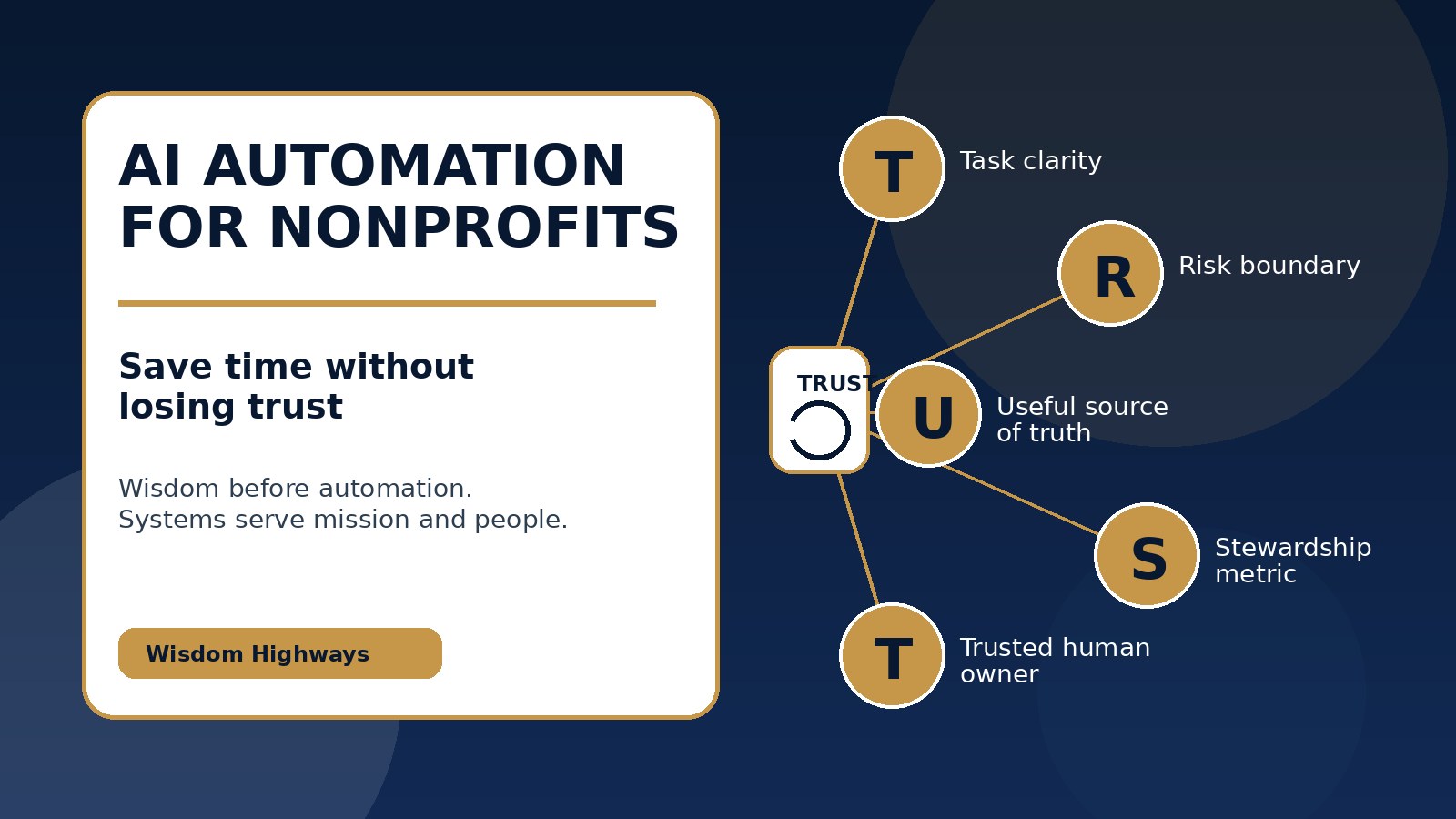
The Wisdom Highways T.R.U.S.T. framework for nonprofit AI
Use this simple framework before approving an AI automation pilot:
- T — Task clarity: Is the work clearly defined in plain language?
- R — Risk boundary: What could go wrong, and what must AI never decide alone?
- U — Useful source of truth: Which approved documents, records or templates should the tool use?
- S — Stewardship metric: How will we measure time reclaimed, response speed, quality, consistency or staff capacity?
- T — Trusted human owner: Who reviews outputs, handles exceptions and remains accountable?
If any part of T.R.U.S.T. is missing, the workflow is not ready to scale. Improve the process before adding more automation.
A 14-day nonprofit automation pilot plan
Start small enough to learn safely.
- Days 1–2: Choose one workflow. Select a repetitive administrative task with clear ownership and moderate risk.
- Days 3–4: Map the current process. Write the trigger, inputs, steps, owner, review point and definition of “done well.”
- Days 5–6: Set boundaries. Decide what data is allowed, what must be excluded, what requires human approval and where outputs are stored.
- Days 7–10: Test with a small batch. Run the workflow with limited records or examples. Compare AI-assisted output with the current manual process.
- Days 11–12: Measure value. Track time saved, errors found, review burden, staff confidence and quality of output.
- Days 13–14: Decide. Improve, pause or scale carefully. Do not scale if trust, accuracy or ownership is unclear.
How to measure value without exaggerating ROI
Nonprofits should avoid vague claims such as “AI will transform everything.” Measure practical improvements instead:
- minutes saved per donor acknowledgment, report draft or volunteer follow-up;
- response time for supporters, partners or beneficiaries;
- reduction in duplicate admin work;
- number of errors caught before communication is sent;
- staff or volunteer confidence using the new workflow;
- leader visibility into overdue tasks;
- capacity redirected toward care, fundraising, program quality or strategic planning.
This connects with the Wisdom Highways Time Reclamation approach: the goal is not merely to do more tasks. The goal is to release people for work that requires presence, judgement, creativity, compassion and leadership.
Common mistakes nonprofit leaders should avoid
- Buying tools before mapping work. A new platform cannot fix an unclear process.
- Using public AI tools with sensitive information. Define data rules first.
- Automating donor communication without human tone review. Gratitude should not feel generic.
- Letting AI summarize impact stories without consent and context. People’s stories deserve dignity.
- Ignoring staff anxiety. Explain that AI is being used to remove burden, not erase human contribution.
- Measuring usage instead of outcomes. Prompts and tool logins are not the same as mission value.
Internal links and next resources
If this topic is new for your team, start with What Is an AI Agent? and AI vs Automation. If your leadership team is already considering implementation, read AI Governance Checklist for Churches and Small Businesses, What Should You Automate First? and AI Implementation Mistakes Leaders Should Avoid.
Final thought: protect trust while reclaiming time
AI automation can help nonprofits reclaim time, improve consistency and reduce preventable administrative pressure. But the work must begin with mission, people, governance and clear boundaries.
The best nonprofit AI strategy is not the loudest or most futuristic. It is the one your team can explain, govern, measure and trust.
Sources and further reading
Keep learning with Wisdom Highways. Follow our WhatsApp Channel for practical AI tips, time-saving ideas, product updates and selected offers.
Follow WH Premium AI Vault on WhatsApp