
AI Readiness · Access Governance · Leadership Systems
AI Access Control Checklist: Who Should Be Allowed to Use Which Tools?
Freshness note: prepared September 2026 for churches, nonprofits, SMEs and purpose-driven organizations reviewing AI permissions, staff roles, volunteers, contractors and sensitive workflows.
AI risk does not only come from the tool itself. It also comes from who can use the tool, what the tool can reach, and whether anyone remembers to remove access when a role changes. A harmless writing assistant becomes more serious when it can read shared drives. A meeting summarizer becomes more sensitive when leaders discuss pastoral care, donor issues, staff matters or client details. An AI agent becomes a governance concern when it can send emails, update records or trigger workflows without clear approval.
That is why leaders need an AI access control checklist. Before your organization gives broad access to ChatGPT Team, Microsoft Copilot, Google Gemini, AI meeting tools, CRM assistants, automation platforms or custom agents, you need a simple answer to a practical question: who should be allowed to use which AI tools, for which purpose, under what boundaries?
This is not about fear. It is about stewardship. Churches, nonprofits and small businesses often operate with lean teams, trusted volunteers and fast-moving work. Access can spread quietly because everyone is trying to save time. Wisdom-led leadership brings clarity before speed.
What is AI access control?
AI access control is the discipline of deciding which people, roles, teams and partners can use specific AI-enabled systems and what those systems are allowed to access or do. It includes login access, workspace membership, file permissions, integrations, browser extensions, API keys, automation triggers, shared prompts, custom GPTs, agents, copilots and admin settings.
Traditional access control asks who can see or change information. AI access control asks that question plus several new ones: can this person paste sensitive data into the tool? Can the tool summarize private meetings? Can it search internal documents? Can it generate public-facing advice? Can it connect to email, CRM, accounting, website forms or donor records? Can it act automatically?
The goal is not to block responsible use. The goal is to match access to role, purpose, risk and accountability. NIST’s AI Risk Management Framework emphasizes governing, mapping, measuring and managing AI risks. Access control belongs in the “govern” and “manage” disciplines because leaders cannot manage AI responsibly if permissions are unclear.
Why broad AI access can become risky
Many organizations start with a generous approach: “Let the team experiment.” That can be healthy in low-risk contexts. But broad experimentation becomes dangerous when it touches personal data, confidential files, pastoral conversations, client details, donor records, financial information, children’s ministry data, HR documents, legal material or high-stakes decisions.
OWASP’s guidance on risks for large language model applications highlights concerns such as sensitive information disclosure, insecure output handling, excessive agency and supply-chain risk. In plain language: AI tools can leak information, produce outputs people misuse, act too broadly if permissions are excessive, or inherit risk from vendors and plugins. Access design is one of the simplest ways to reduce those risks before they become incidents.
CISA’s secure-by-design mindset is also relevant. Leaders should not rely only on end-user caution after a system is already wide open. The safer pattern is to build reasonable guardrails into the setup: least privilege, strong authentication, careful integrations, owner accountability and regular review.
The Wisdom Highways access principle: permission should follow purpose
Wisdom Highways recommends a simple rule: permission should follow purpose. A person should receive access because a defined role or workflow needs it, not because the tool is fashionable or because “everyone might use it someday.”
For example, a communications assistant may need access to an AI writing tool for public announcements, but not to donor spreadsheets. A finance officer may need an approved summarization workflow for policy documents, but not an unrestricted agent connected to payment records. A pastor may use AI for sermon research support, but counselling notes and sensitive prayer requests should remain under stricter boundaries. A sales team member may use AI to draft follow-up emails, but outputs should be reviewed before promises or pricing are communicated.
When permission follows purpose, AI becomes a servant of mission rather than a hidden door into the organization.
AI access control checklist for leaders
Use the following checklist before granting or expanding AI access. A simple spreadsheet or access register is enough for many smaller organizations.
1. Define the role, not just the person
Start with roles: pastor, administrator, finance lead, communications manager, volunteer coordinator, sales representative, operations assistant, contractor, board member or external agency. Role-based access is safer than giving permissions based on personal familiarity. It also makes offboarding easier when people change positions.
2. Name the approved use case
Write the specific job the AI tool is allowed to support: drafting social captions, summarizing public articles, preparing meeting agendas, analyzing anonymized feedback, routing support tickets, creating design concepts, generating code prototypes or drafting internal documentation. Avoid vague permission such as “use AI for productivity.” Vague access invites scope creep.
3. Classify the data involved
Before access is granted, identify whether the user may handle public, internal, confidential, personal, financial, pastoral, client, children’s, HR, legal, medical or donor data. Some tools may be acceptable for public and internal content but unacceptable for confidential records. Leaders should explicitly say what must never be pasted, uploaded, connected or summarized.
4. Check the tool’s permission depth
Ask what the AI system can reach. Is it standalone chat? Does it connect to cloud storage, email, calendar, CRM, helpdesk, accounting, website forms, databases or APIs? Does it use browser access? Does it read every page the user visits? Does it create outputs only, or can it take actions? The deeper the integration, the stronger the access review should be.
5. Apply least privilege
Give the minimum access needed for the real workflow. If a staff member only needs AI to draft public announcements, they do not need an AI assistant connected to all organizational documents. If a contractor only needs a project folder, do not connect them to the full workspace. Least privilege is not mistrust; it is good leadership hygiene.
6. Require human review for public or sensitive outputs
Access should include responsibility. If AI outputs influence public teaching, pastoral communication, customer advice, financial recommendations, HR actions, contracts, strategy, marketing claims or donor communication, assign a human reviewer. The more sensitive the output, the more clearly review should be documented.
7. Separate admin access from user access
AI admin rights should be limited. Admins may add users, change data settings, connect integrations, manage billing, approve plugins, export data or change retention rules. That level of access should not be given casually. Small teams may have only one or two AI workspace administrators, with a backup person and clear responsibility.
8. Control plugins, extensions and agents
AI risk often increases when tools connect outward. Browser extensions, plugins, custom GPT actions, API keys, automation platforms and autonomous agents deserve separate approval. An AI chat used for brainstorming is very different from an AI agent that can read email, update records or send messages.
9. Set review and expiry dates
Access should not be permanent by default. Set a review date for every AI tool, especially pilots and contractor access. Review access after role changes, staff exits, project completion, incidents, vendor updates, policy changes or new integrations. If nobody knows when access was last reviewed, it has probably been too long.
10. Keep an access log
Maintain a simple record: tool, owner, user or role, access level, approved use case, data allowed, integrations, reviewer, approval date, next review date and offboarding status. This connects naturally with an AI tool inventory and an AI governance review cadence.
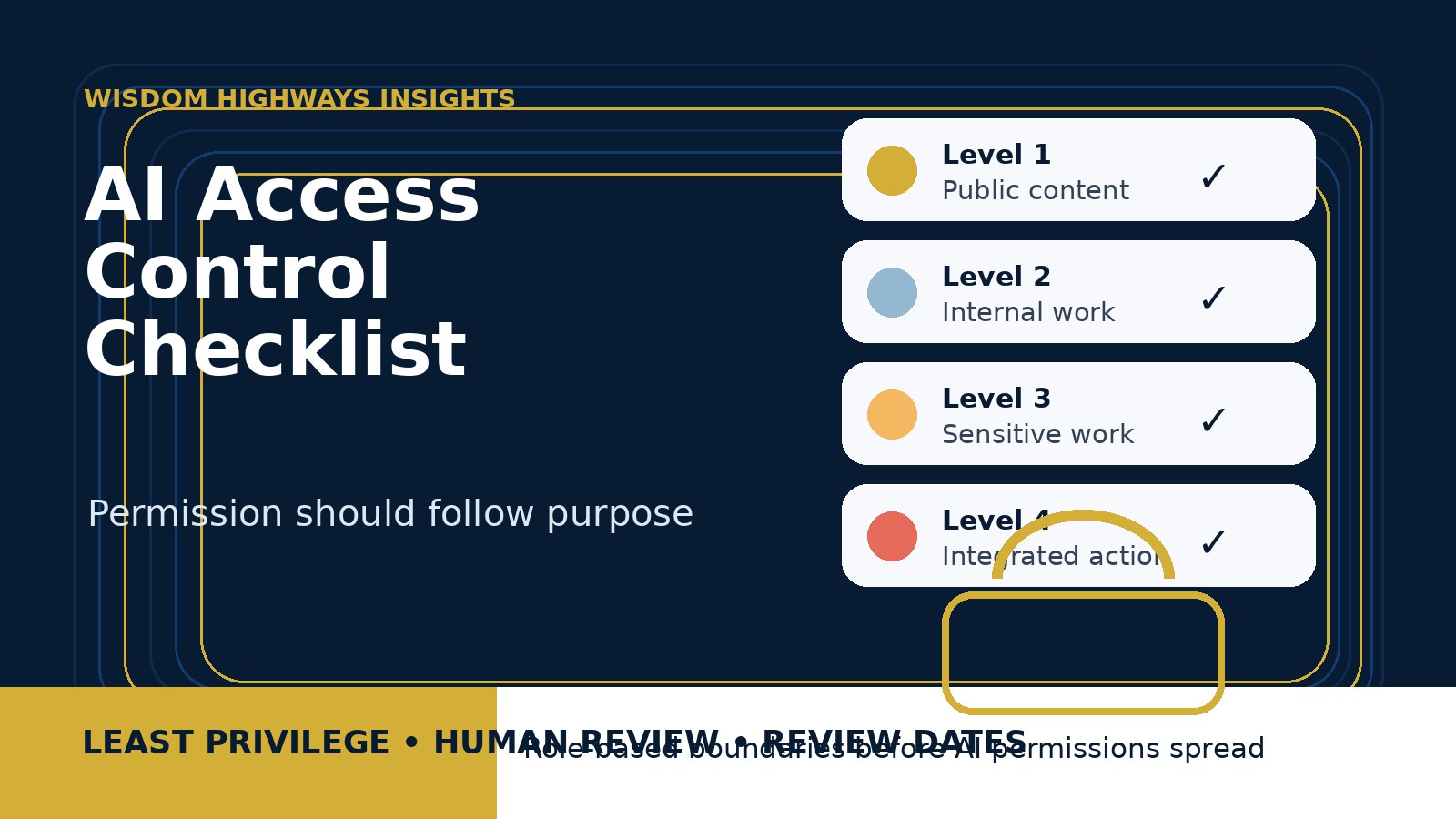
A simple access-level model
Leaders do not need complicated language. Use five levels:
- Level 0 — No access: the tool is not approved for the person, role or workflow.
- Level 1 — Public-content use: brainstorming, outlines, general research support and public information only.
- Level 2 — Internal-work use: approved internal documents, templates or operational content with no sensitive personal data.
- Level 3 — Sensitive-work use: controlled use involving confidential, personal, pastoral, donor, client, HR or financial context; requires stronger review.
- Level 4 — Integrated or action-taking use: AI connected to systems or able to trigger actions; requires leadership approval, testing, monitoring and documented accountability.
This model helps a pastor, executive director or business owner quickly explain why some people can use a tool for drafting content but not for sensitive records or automated actions.
Examples for churches, nonprofits and SMEs
Church example
A church gives the communications team Level 1 access to an AI writing assistant for public announcements and event descriptions. Pastoral staff may use AI for sermon research support with public sources, but counselling notes, prayer requests involving private details and children’s ministry records are not allowed in the tool. Meeting transcription is restricted for sensitive leadership meetings unless the team has approved retention and consent boundaries.
Nonprofit example
A nonprofit allows program staff to summarize anonymized survey feedback, but beneficiary stories with identifiable personal details require redaction first. The fundraising team may use AI to draft donor updates from approved public program notes, but donor records and payment details are not pasted into public tools. Contractors receive access only to project folders and lose access at project close.
Small-business example
A small consulting firm uses AI to draft proposals, summarize research and create support-ticket themes. The owner discovers that a browser extension can read client dashboards. Access is changed: the extension is removed, a team workspace is approved, client files are limited, and proposal drafts must be checked by the account owner before sending.
Common mistakes to avoid
- Giving everyone the same access. Equal access is rarely wise when roles and risks differ.
- Ignoring volunteers and contractors. Temporary access can become permanent if nobody owns offboarding.
- Approving the tool but not the use case. A tool can be safe for one workflow and risky for another.
- Forgetting embedded AI. AI inside email, CRM, cloud storage or design tools still needs access review.
- Allowing integrations before policy is ready. Connected tools create more risk than standalone drafting tools.
- Depending only on verbal reminders. Written boundaries protect people and reduce confusion.
How to run the first AI access review meeting
- List active AI tools using your inventory.
- Identify users and roles for each tool.
- Write the approved use case in plain language.
- Classify the highest-risk data the tool could touch.
- Check integrations such as email, drives, CRM, calendar, forms, payment systems or browser access.
- Assign access levels from 0 to 4.
- Remove unnecessary access and document the reason.
- Set next review dates and owners.
- Teach the boundary to staff, volunteers and contractors.
Wisdom Highways perspective: access is discipleship for systems
Systems teach behavior. When access is careless, people learn that speed matters more than stewardship. When access is wise, people learn that tools serve mission, trust and human responsibility. For faith-aligned and purpose-driven organizations, this is more than technical hygiene. It is a leadership practice.
AI can help reclaim time and reduce repetitive work, but reclaimed time should not come at the cost of trust. The right access boundaries help leaders say yes to useful tools without opening every door at once. They protect people, preserve accountability and make innovation safer.
Quick checklist before you grant AI access
- Is the role clearly defined?
- Is the approved use case written down?
- Is sensitive data prohibited or controlled?
- Does the tool connect to other systems?
- Is least privilege applied?
- Is a human reviewer assigned for public or sensitive outputs?
- Are admin rights restricted?
- Are plugins, browser extensions and agents separately approved?
- Is there a review or expiry date?
- Will access be removed when the role, project or contract ends?
Supporting sources and further reading
- NIST AI Risk Management Framework — governance, mapping, measuring and managing AI risk.
- OWASP Top 10 for Large Language Model Applications — common LLM application risks including sensitive information disclosure and excessive agency.
- CISA Secure by Design resources — security principles that support safer software and system setup.
- Microsoft Zero Trust identity guidance — identity and access principles useful for modern cloud environments.
Related Wisdom Highways insights
Keep learning with Wisdom Highways. Follow our WhatsApp Channel for practical AI tips, time-saving ideas, product updates and selected offers.
Follow WH Premium AI Vault on WhatsApp