
AI Governance • Incident Response • Trust Protection
AI Incident Response Plan: What Leaders Should Do When AI Goes Wrong
The question is not whether every AI-assisted workflow will be perfect. The question is whether your organization will know what to do when something goes wrong.
A chatbot gives the wrong answer. A staff member pastes sensitive information into a public AI tool. A draft message goes out with a fabricated detail. An automation sends the right message to the wrong person. A vendor tool changes its settings. A volunteer uses AI in a way leadership never approved.
For churches, nonprofits and small businesses, incidents like these may not begin as dramatic emergencies. They often begin as quiet confusion: “Who should handle this?” “Do we tell anyone?” “Should we pause the tool?” “Was private data involved?” “Can we keep using the workflow?”
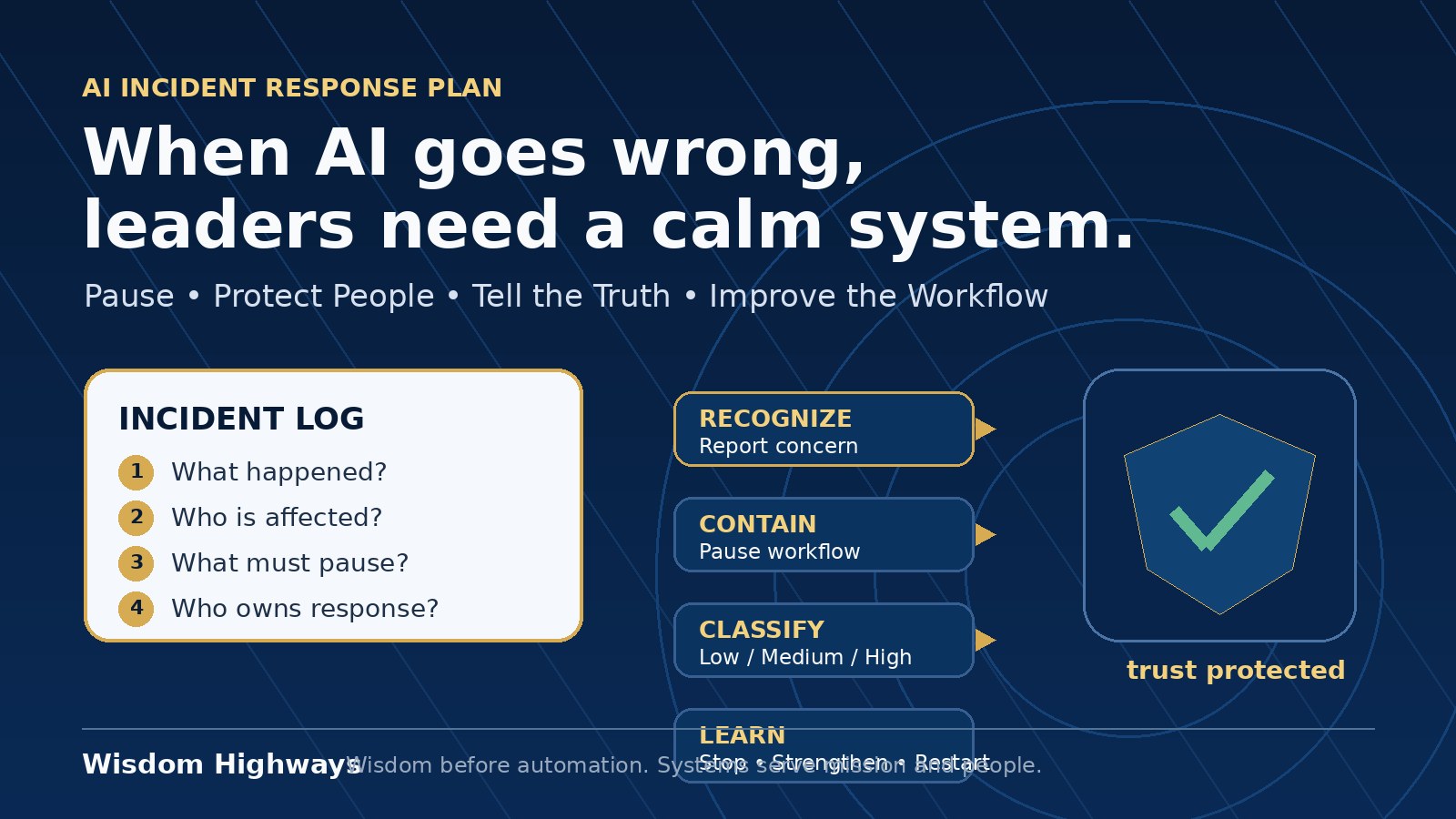
An AI incident response plan gives leaders a calm, practical answer before pressure arrives. It does not require a large compliance department. It requires clear ownership, honest review, fast containment, careful communication and a learning loop that strengthens the system.
If AI is already entering your workflows, do not wait for a mistake before assessing readiness. Take the AI & Systems Readiness Assessment to identify governance, workflow and people-readiness gaps before automation scales.
What counts as an AI incident?
An AI incident is any AI-assisted event that could harm people, privacy, trust, truthfulness, operations, compliance, reputation or mission. It can involve generative AI, automation, chatbots, copilots, recommendation tools, classification systems, AI agents or vendor platforms.
Examples include:
- private, pastoral, donor, customer, HR or financial information being entered into an unapproved AI tool;
- AI-generated content making a false claim in a public post, email, report or sermon-support note;
- a workflow sending a message before human approval;
- a chatbot giving misleading guidance to a visitor, customer, beneficiary or church member;
- AI-assisted decisions affecting people without review, appeal or accountability;
- a vendor tool changing data use, retention or model-training settings;
- staff becoming dependent on an AI output that nobody is checking.
The goal is not to create fear around AI. The goal is to protect people and mission while still using technology responsibly.
Why an AI response plan matters now
Global AI governance guidance increasingly emphasizes risk management, accountability, human oversight and transparency. The NIST AI Risk Management Framework encourages organizations to govern, map, measure and manage AI risk in context. The NIST Generative AI Profile highlights risks such as inaccurate or fabricated content, data privacy concerns and misuse. The OECD AI Principles stress human-centered values, transparency, robustness, security and accountability. The UK Information Commissioner’s Office AI guidance reminds organizations using AI with personal information that data protection obligations still apply.
Those principles can sound high-level. Wisdom Highways translates them into a simple leadership discipline:
When AI creates risk, pause the workflow, protect people, tell the truth, assign ownership and improve the system before scaling again.
That is wisdom before automation in practical form.
The seven-step AI incident response plan
Use this as a starter plan for a church, nonprofit, school, ministry team, consultancy, ecommerce business, service company or purpose-driven organization. Adapt it to your legal and sector requirements, but keep the plain-language structure.
1. Recognize and record the incident
Make it easy for staff, volunteers and leaders to report AI concerns without embarrassment. Many incidents stay hidden because people fear blame or do not know whether the issue “counts.” Your policy should say: when in doubt, report it.
Record the basics in one place:
- what happened;
- which tool or workflow was involved;
- who noticed it;
- when it happened;
- what data, people or audience may be affected;
- whether the issue is still active.
This does not need to be complex. A secure form or incident log is enough at the beginning. The important thing is that the organization stops relying on scattered WhatsApp messages, private inboxes and memory.
2. Contain the risk quickly
Containment means reducing further harm while leaders assess the facts. Depending on the situation, this may mean:
- pausing the automation;
- disabling a chatbot response;
- removing or correcting public content;
- revoking access to a tool;
- stopping a campaign send;
- asking a vendor about data handling;
- switching to manual review until the workflow is safe again.
Do not keep a questionable workflow running simply because it saves time. Time Reclamation is not real if the saved minutes become trust repair later.
3. Classify severity in plain language
Small teams need a simple severity model. Use three levels:
- Low: limited internal issue, no sensitive data, no public impact, easy correction.
- Medium: possible affected audience, public correction needed, repeated workflow weakness, moderate trust risk or unclear data exposure.
- High: sensitive data, vulnerable people, pastoral care, safeguarding, HR, finance, legal, donor trust, customer promises, public misinformation, security concern or regulatory reporting possibility.
Severity does not only depend on the technology. It depends on the people affected. A wrong AI answer in a private draft may be low. A wrong AI answer sent to a grieving family, donor, beneficiary or customer may be high because relationship and trust are involved.
4. Assign one accountable owner
Every AI incident needs one named owner. The owner coordinates review, communication, vendor contact, documentation and follow-up. This person does not have to solve everything alone, but they must make sure the issue does not drift.
For a church, the owner might be an operations lead, administrator, executive pastor or ministry director. For a small business, it may be the owner, operations manager, data lead or customer experience manager. For a nonprofit, it may be the programme lead, compliance lead or executive director.
Avoid “the team will handle it.” Shared concern without named ownership often becomes no ownership.
5. Review data, people and truthfulness
Before deciding what to communicate, answer three questions:
- Data: Did the AI tool receive, expose, store or generate sensitive information?
- People: Who may have been affected, and are any of them vulnerable, confidential or owed direct care?
- Truthfulness: Did AI create, alter or spread something inaccurate, misleading or unsupported?
If personal information may be involved, seek appropriate legal or data-protection advice for your jurisdiction. This article is not legal advice; it is a leadership framework for responsible preparation.
6. Communicate with humility and clarity
Not every incident requires a public statement. Some need internal correction only. Others require direct notice to affected people, a correction to a post or email, vendor escalation, or formal reporting under applicable rules.
Good communication should be honest, proportionate and non-defensive:
- state what happened in plain language;
- avoid blaming “the AI” as if people had no responsibility;
- explain what has been paused, corrected or reviewed;
- tell affected people what they need to do, if anything;
- commit to a specific improvement rather than vague reassurance.
Trust is protected not by pretending mistakes never happen, but by showing that leadership responds with wisdom.
7. Learn, update and decide whether to restart
The final step is the one many organizations skip. After the urgent issue is handled, update the system:
- revise the prompt, workflow, approval step or policy;
- add the incident to the AI risk register;
- update staff training;
- change vendor settings or permissions;
- add human review before messages go public;
- tighten data boundaries;
- decide stop, strengthen or restart.
The restart decision matters. Some workflows should resume quickly with a small safeguard. Some need redesign. Some should stop completely until leadership is ready.
Examples for churches, nonprofits and SMEs
Church example: AI-assisted pastoral email draft
A team member uses AI to draft a pastoral follow-up email and includes details from a private conversation. The issue is not only the email quality; it is the handling of sensitive pastoral information.
A wise response would pause AI use for pastoral care drafts, document what was entered, check whether the tool stored the data, notify the appropriate leader, remove sensitive details from future prompts, and create a rule that pastoral notes are never pasted into external AI tools.
Nonprofit example: AI-generated impact summary
A nonprofit uses AI to polish a funder report. The draft turns careful programme notes into stronger-sounding claims that were not actually measured. Nobody intended to mislead, but the output overstates impact.
The response should correct the report before submission, require source-backed wording, add a human fact-check step and train staff to distinguish evidence from interpretation.
Small business example: chatbot refund promise
A customer-service chatbot tells a customer they qualify for a refund even though the policy requires review. The company now has a customer expectation, a policy inconsistency and a workflow problem.
The response should pause that answer path, review recent conversations, contact affected customers carefully, restrict the chatbot to approved policy language and require human approval for refunds, complaints and exceptions.
What to prepare before an incident happens
The best response plan is prepared before emotions are high. Leaders should decide in advance which AI workflows are approved, which data is never allowed inside public tools, who can pause an automation, who contacts a vendor, and who approves any communication to affected people. This preparation is especially important where volunteers, part-time staff or distributed teams use AI tools informally.
Preparation also protects good innovation. When people know the boundaries, they can experiment more safely. When they know how to report concerns, they are less likely to hide mistakes. When leaders review incidents without panic or blame, the whole organization becomes wiser. The goal is not to slow every idea. The goal is to make sure time-saving systems do not outrun trust, truth or care for people.
The one-page AI incident response template
Use these fields as a starter form:
- Incident title.
- Date discovered.
- Tool/workflow involved.
- Reporter.
- Accountable owner.
- What happened?
- Who or what may be affected?
- Was personal, confidential or sensitive data involved?
- Was inaccurate or misleading content created or shared?
- Severity: low, medium or high.
- Immediate containment action.
- Communication required: none, internal, direct affected parties, public, vendor, legal/data-protection advice.
- Root cause or contributing factor.
- System improvement.
- Restart decision: stop, strengthen or restart.
- Review date.
Common mistakes to avoid
- Blaming the tool instead of owning the workflow. AI does not remove human accountability.
- Fixing the visible mistake but not the system that allowed it. A correction without a process change invites repetition.
- Over-communicating or under-communicating. Match communication to severity, impact and obligations.
- Leaving volunteers or junior staff to decide alone. AI incidents that affect people or trust need leadership oversight.
- Restarting too quickly because the tool is convenient. Convenience is not readiness.
Related Wisdom Highways resources
- AI Risk Register Template
- AI Pilot Program Checklist
- AI Vendor Due Diligence Checklist
- Human-in-the-Loop AI Review
- AI Data Privacy Checklist
Build the response plan before you need it.
If your organization is using AI in content, admin, care, customer service, reporting or decision support, do not wait for an incident to reveal readiness gaps. Start with the AI & Systems Readiness Assessment and identify where governance, ownership, data boundaries and human review need strengthening.
Freshness note: Prepared in September 2026. Review this guidance as AI tools, privacy expectations, incident-reporting rules and organizational policies change.
Keep learning with Wisdom Highways. Follow our WhatsApp Channel for practical AI tips, time-saving ideas, product updates and selected offers.
Follow WH Premium AI Vault on WhatsApp