
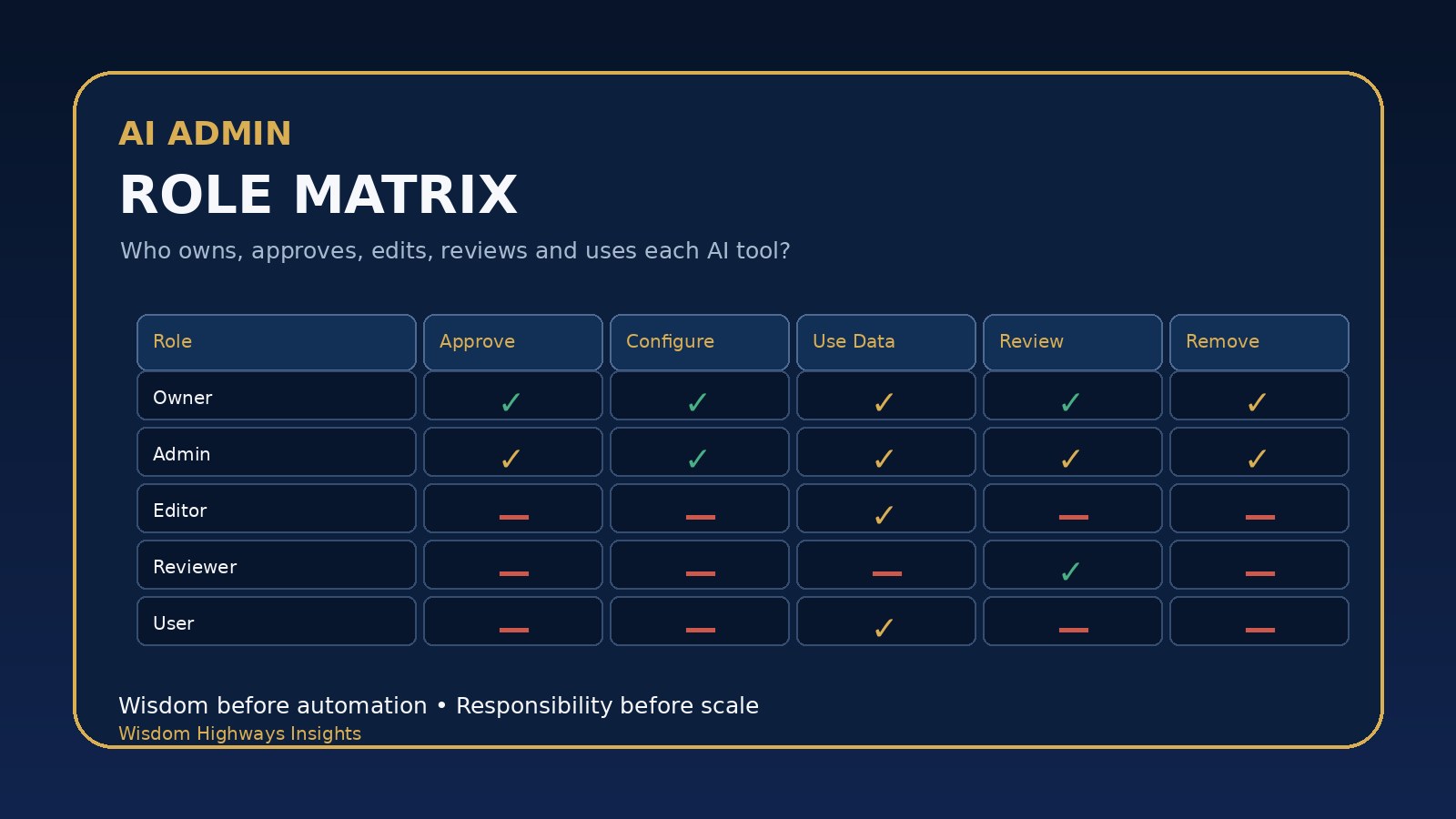
AI does not only need users. It needs responsible roles. If everyone can experiment, edit settings, connect apps, export data, approve outputs and invite new users, your organization has not scaled AI. It has scaled confusion.
That is why growing teams need an AI admin role matrix. A role matrix answers a simple leadership question before the pressure arrives: who is allowed to do what with each AI tool?
This guide is for pastors, ministry administrators, nonprofit leaders, SME owners and operations managers who want AI to serve the mission without creating hidden risk. It gives you a practical matrix for assigning owners, administrators, editors, reviewers and everyday users before your AI setup becomes too loose to govern.
Why role clarity matters before AI scale
Most organizations do not create AI confusion intentionally. It usually grows from practical convenience. A team member opens an account. Someone connects a shared drive. A volunteer uses a writing tool. A manager experiments with a chatbot. A vendor is invited for one project and remains connected afterwards.
The problem is not enthusiasm. The problem is authority without clarity. If no one knows who owns the tool, who may approve new use cases, who may change settings, who may handle sensitive information, and who must review outputs, then AI adoption becomes dependent on habit rather than wisdom.
NIST’s AI Risk Management Framework points leaders toward governing, mapping, measuring and managing AI risk across the system lifecycle. NIST’s Cybersecurity Framework also places governance and protection at the center of responsible digital operation. For a church, nonprofit or small business, the lesson is direct: AI governance is not only a technical issue. It is a responsibility structure.
Wisdom Highways frames this as wisdom before automation. Tools can accelerate the work, but only clear responsibility can protect the people, data, message and mission behind the work.
The five roles every AI tool should define
You do not need a large enterprise department to define AI roles. Even a small team can create a simple matrix. Start with five roles and adjust them for your size and risk level.
1. Tool owner
The tool owner is accountable for why the AI tool exists. This person decides whether the tool still serves the mission, whether the use case is approved, and whether the value justifies the risk, cost and maintenance. In a ministry, the owner might be the pastor, administrator or department lead. In a small business, it might be the operations lead, sales manager or founder.
- Approves the business or ministry purpose.
- Confirms the tool fits the organization’s values and risk appetite.
- Reviews whether the tool should continue, change or be retired.
- Ensures someone is assigned to administer the tool properly.
2. AI administrator
The administrator manages the practical settings: accounts, permissions, integrations, billing, access removal and configuration. This role should not be assigned casually. Administrators can often invite users, connect apps, change retention settings, export data or alter how a tool behaves.
- Adds and removes users.
- Controls permissions and integrations.
- Maintains the AI tool inventory.
- Runs or supports the AI access review checklist.
- Escalates suspicious activity, data concerns or configuration changes.
3. Content or workflow editor
The editor uses AI to draft, refine, summarize, organize or automate work inside an approved boundary. Editors may create prompts, revise outputs, prepare documents or manage workflow steps. They should not automatically have administrator rights.
- Uses AI only for approved tasks.
- Follows data-handling and review rules.
- Does not connect new apps or change core settings without approval.
- Labels AI-assisted work where the organization requires it.
4. Human reviewer or approver
The reviewer checks AI-assisted outputs before they affect people, money, doctrine, public communication, pastoral care, customers or decisions. This role is especially important when AI supports sermons, sensitive emails, donor messages, proposals, staff documents, legal-adjacent communication or customer-facing answers.
- Reviews accuracy, tone, values and risk.
- Rejects or rewrites weak AI outputs.
- Confirms that sensitive claims are supported.
- Ensures AI serves people rather than replacing judgment.
5. Everyday user
An everyday user may ask approved questions, draft basic content, summarize non-sensitive notes or use a configured workflow. This role should have the least privilege necessary. The user should know what not to paste into AI, when to ask for review, and where to report a mistake.
A simple AI admin role matrix
Use this starter matrix, then adapt it to your actual tools and people.
| Decision or action | Owner | Admin | Editor | Reviewer | User |
|---|---|---|---|---|---|
| Approve the tool’s purpose | Yes | Advise | No | Advise | No |
| Add or remove users | Approve for high-risk tools | Yes | No | No | No |
| Change permissions | Approve for sensitive roles | Yes | No | No | No |
| Connect another app or data source | Approve | Configure after approval | No | Review impact | No |
| Use AI for approved drafting or workflow tasks | Sometimes | Sometimes | Yes | Sometimes | Yes, within limits |
| Approve public or sensitive output | Sometimes | No, unless assigned | No | Yes | No |
| Export data or reports | Approve for sensitive data | Yes, if needed | Only if approved | Only if needed | No by default |
| Retire the tool | Approve | Execute removal | No | Advise | No |
This matrix is not bureaucracy. It is a protection for speed. When roles are clear, people can move faster because they know the boundary.
Questions to ask before assigning AI roles
- What can this AI tool see? Consider documents, prompts, transcripts, files, contacts, donor records, customer information, calendars, financial details and internal strategy.
- What can this tool change? Can it send messages, update CRM records, publish content, trigger automations or make recommendations that people may treat as final?
- Who can invite others? Invitation rights should be limited, especially for paid tools and tools connected to sensitive data.
- Who reviews output before it reaches people? Pastoral, legal, financial, health, HR, doctrinal and customer-impacting outputs need human review.
- How will access be removed? Staff changes, volunteer transitions, contractor endings and vendor project closures should trigger permission review.
These questions connect directly to access control and account management principles found in frameworks such as the CIS Critical Security Controls. They also support secure-by-design thinking: reduce preventable weaknesses before the tool becomes deeply embedded in daily operations.
Church, nonprofit and small-business examples
A church communications team may allow volunteers to draft event captions with AI, but only a ministry leader or communications reviewer should approve public messaging. The administrator should control who can access brand assets, social scheduling tools and member-related information.
A nonprofit fundraising team may use AI to draft donor newsletters or grant summaries, but donor data should be handled carefully. The owner approves the use case, the administrator controls data access, and a reviewer checks tone, accuracy and confidentiality before anything is sent.
A small business sales team may use AI to draft follow-up emails and summarize meetings. But only approved users should connect AI to the CRM, export customer lists or change automated sequences. The sales manager owns the business purpose, while operations administers permissions.
Common mistakes to avoid
- Making the most technical person the owner by default. Technical skill helps, but ownership belongs to the person accountable for purpose, risk and outcome.
- Giving administrator access for convenience. Admin rights should be rare, documented and reviewed.
- Using shared logins. Shared accounts make it harder to remove access, investigate mistakes and assign responsibility.
- Letting vendors keep access after projects end. Contractor and vendor access should have end dates.
- Skipping human review because AI sounds confident. Confidence is not the same as truth, wisdom or suitability.
A 30-minute implementation plan
- Choose one AI tool currently used by your team.
- Write down the current users, administrators and connected systems.
- Name the tool owner and backup administrator.
- Use the matrix above to decide who may approve, configure, edit, review and use the tool.
- Remove unnecessary administrator rights.
- Document sensitive data rules: what may not be pasted, uploaded or connected.
- Schedule the next access review and connect it to your AI monitoring plan.
If a tool cannot support reasonable role separation, treat that as a risk signal. You may still use it for low-risk tasks, but be careful before connecting it to sensitive data or critical workflows. A good AI vendor security questionnaire should ask how the tool handles permissions, data access, audit logs and account removal.
Wisdom Highways perspective
AI role clarity is not about slowing innovation. It is about making innovation trustworthy. A church should not lose pastoral sensitivity because a tool is convenient. A nonprofit should not expose donor confidence because access was informal. A small business should not weaken customer trust because everyone had permission to do everything.
The wise path is simple: define responsibility before scale. Let systems serve mission and people. Let automation increase capacity without removing human stewardship.
Next step
If you are unsure whether your AI roles, permissions and workflows are clear enough, take the AI & Systems Readiness Assessment. It will help you identify where your systems need stronger structure before you scale automation further.
Related resources
- AI Access Review Checklist
- AI Tool Inventory Template
- AI Change Control Policy
- AI Data Retention Policy
Sources and further reading
- NIST AI Risk Management Framework
- NIST Cybersecurity Framework 2.0
- CIS Critical Security Controls v8
- CISA Secure by Design
- Microsoft Entra access reviews overview
- Google Secure AI Framework
Freshness note: This article was prepared in October 2026 and should be reviewed as AI governance, identity-management practices and platform permission models evolve.
Keep learning with Wisdom Highways. Follow our WhatsApp Channel for practical AI tips, time-saving ideas, product updates and selected offers.
Follow WH Premium AI Vault on WhatsApp