
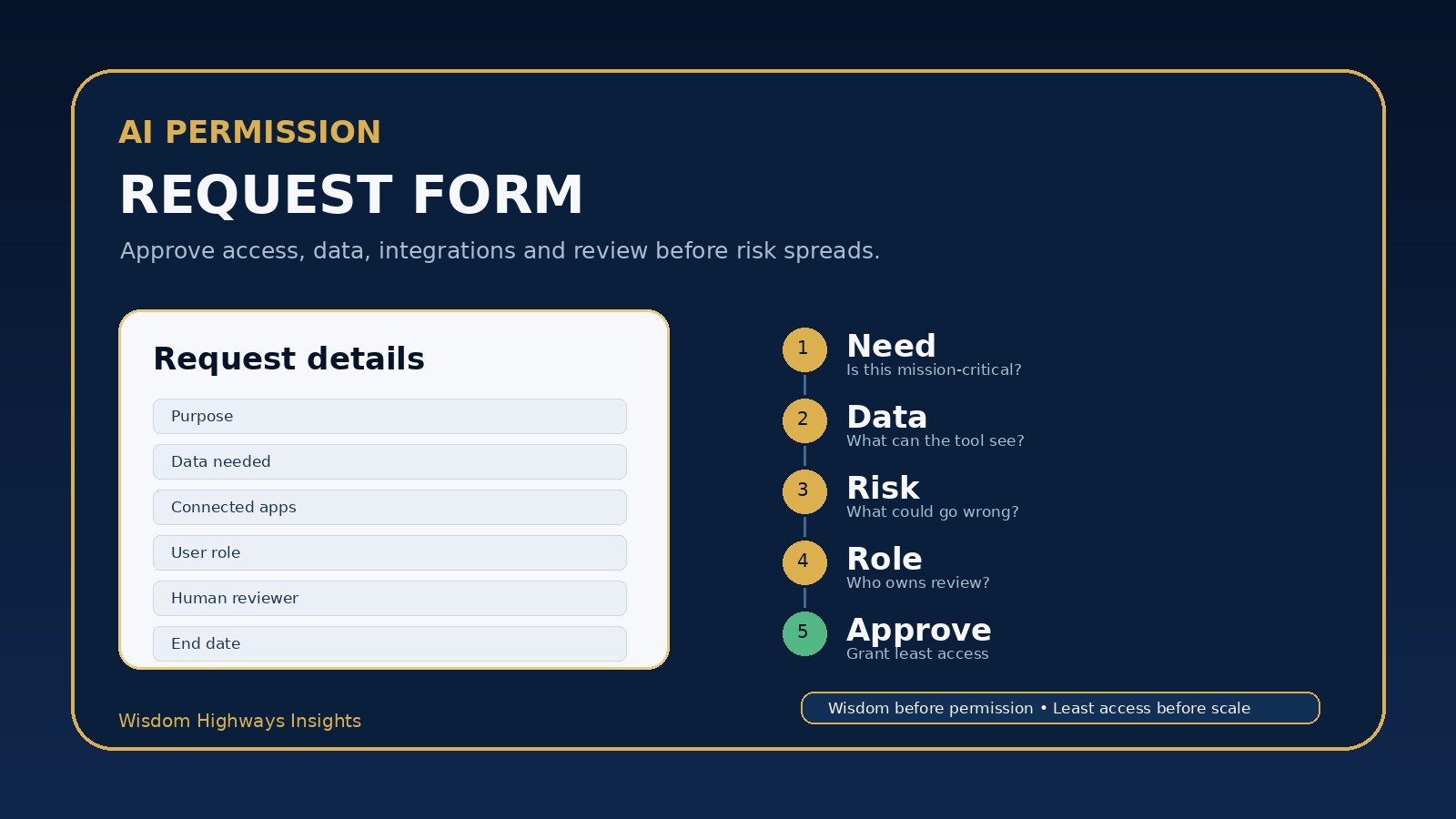
Every new AI tool begins with a small permission decision. Someone asks for access. A manager says yes. A volunteer is added. A contractor is invited. A browser extension is connected. A chatbot is given a document, inbox, calendar, CRM, spreadsheet or social account.
Individually, those decisions may feel harmless. Together, they shape whether your organization uses AI with wisdom or drifts into hidden risk. That is why churches, nonprofits and small businesses need an AI permission request form before granting access to tools, data and integrations.
This is not about bureaucracy. It is about stewardship. A simple request form helps leaders slow down long enough to ask: who needs access, what will the tool see, what will it change, who will review the output, and when should access be removed?
Why AI permissions deserve a separate approval step
Many organizations already approve software purchases, but AI access creates additional questions. A normal app may store data or automate a workflow. An AI tool may also summarize, generate, classify, recommend, draft, retrieve, connect, remember and act across information from multiple systems.
That means a casual permission can become a leadership decision. If a church gives a volunteer access to member notes, the issue is not only technical access; it is pastoral trust. If a nonprofit gives a contractor access to donor information through an AI writing workflow, the issue is not only convenience; it is confidentiality. If a small business connects AI to a customer inbox, the issue is not only productivity; it is brand, promise, privacy and accountability.
Global guidance points in the same direction. The NIST AI Risk Management Framework emphasizes governing, mapping, measuring and managing AI risk. The NIST Cybersecurity Framework 2.0 places governance and protection at the center of responsible digital operation. The CIS Critical Security Controls treat account management and access control as foundational safeguards. For smaller organizations, the practical translation is simple: do not grant AI access without purpose, boundary and review.
Wisdom Highways frames this as wisdom before permission. If a tool can touch people, data, money, doctrine, reputation or customer trust, access should be intentional.
What an AI permission request form should decide
A good request form should be short enough for busy teams to use, but serious enough to reveal risk before access is granted. The goal is not to make every AI experiment impossible. The goal is to separate low-risk assistance from sensitive access.
1. The purpose of the access
Start with the reason. What work will this tool help with? Is it drafting public content, summarizing internal notes, managing customer follow-up, analyzing donor records, organizing sermon material, answering support questions or automating admin tasks?
A vague answer like “to improve productivity” is not enough for sensitive tools. A better answer is: “to draft first-response email templates for new enquiries, with human review before sending.” Purpose determines the level of risk and the kind of permission that makes sense.
2. The data the tool will see
The form should ask what information will be pasted, uploaded, connected or retrieved. Public information is different from internal notes. Internal notes are different from member data, donor records, employee files, health information, financial details, passwords, confidential strategy or personal pastoral matters.
Link this step to your AI data classification rules. If the requester cannot explain what class of data is involved, they are not ready to receive broad access.
3. The systems or apps connected to the tool
AI risk increases when a tool connects to other systems. A standalone writing assistant used for public copy is one thing. An AI tool connected to Google Drive, Microsoft 365, WhatsApp, email, CRM, payment records, church-management software, calendars or social accounts is another.
The request form should list every system the tool can access and every action it can take: read, write, send, delete, publish, export, trigger automation or invite users. This protects the organization from accidentally giving a tool more authority than the requester intended.
4. The requested role and permission level
Not everyone needs administrator access. Many people only need a basic user role. Some need editor access. A few need reviewer or owner responsibilities. Very few should be able to change settings, add integrations, export sensitive information or invite new users.
Use the AI admin role matrix to match permission to responsibility. The principle is least access: give the person enough access to do the approved work, not every permission the tool can provide.
5. The human reviewer
If AI output may affect people, money, doctrine, public communication, customer service, donor trust, staff decisions or vulnerable individuals, the form should name the human reviewer. AI can assist; it should not become the invisible final authority for sensitive work.
For a church, the reviewer may be a pastor, ministry lead or communications owner. For a nonprofit, it may be a program director or fundraising manager. For an SME, it may be the customer success lead, operations manager or founder. The important point is that the reviewer is named before access is granted.
6. The end date or review date
Permissions should not last forever by default. Contractors finish projects. Volunteers rotate. Staff roles change. Tools are tested and abandoned. Trials become forgotten accounts. A request form should set either an end date or a review date so access does not quietly remain long after the need is gone.
This connects directly to your AI access review checklist. Approval and review are two sides of the same governance habit.
A practical AI permission request form template
Use this as a starter template. Keep it in a shared document, project-management form, helpdesk form or internal operations system.
| Question | What the requester should answer | Why it matters |
|---|---|---|
| Who is requesting access? | Name, role, team and manager or ministry leader. | Connects access to a real person and accountability path. |
| Which AI tool or feature? | Tool name, vendor, account, workspace and link if available. | Prevents vague approval for unknown systems. |
| What work will it support? | Specific task, workflow or use case. | Confirms mission fit and avoids open-ended experimentation in sensitive areas. |
| What data will be used? | Public, internal, confidential, personal, financial, donor, member, customer or staff data. | Reveals privacy and trust implications before access is granted. |
| What systems will be connected? | Email, drive, CRM, church database, calendar, social, payment, automation tools or none. | Shows whether the tool can read, change, send, publish or export information. |
| What permission level is requested? | User, editor, reviewer, admin, owner or vendor/contractor. | Supports least-access decisions. |
| Who reviews the output? | Name or role responsible for human review. | Protects trust-sensitive decisions and communication. |
| How long is access needed? | End date, trial date or next review date. | Prevents stale access and forgotten permissions. |
| What could go wrong? | Simple risk statement and mitigation. | Encourages wisdom before automation. |
| Who approves? | Owner, administrator, security/operations lead or ministry/business leader. | Creates a clear decision record. |
Approval rules for different risk levels
Not every request needs the same level of review. A simple risk tier keeps the process practical.
- Low-risk access: public information, no sensitive data, no integrations, no automated sending or publishing. Example: drafting generic event captions from already public details.
- Medium-risk access: internal information, team documents, customer or member context that is limited and reviewed. Example: summarizing internal meeting notes where confidential details are excluded.
- High-risk access: personal data, donor records, member-care notes, staff information, CRM access, financial information, legal-adjacent content, automated messages or public publishing. Example: connecting AI to an inbox or church-management system.
Low-risk access may be approved by a team lead using a simple form. Medium-risk access should involve the tool owner and administrator. High-risk access should require leadership approval, data rules, named human review and a review date. If the tool is new or poorly understood, use an AI vendor security questionnaire before connecting it to sensitive systems.
Examples for churches, nonprofits and small businesses
Church example: A youth ministry volunteer wants access to an AI design and caption tool for event promotion. The form confirms the tool will use public event details only, no member records, no pastoral notes and no automatic posting. The communications lead reviews captions before publication. Access is reviewed after the event season.
Nonprofit example: A fundraising assistant wants to use AI to draft donor email variations. The form reveals that donor history may be involved. The decision is to use anonymized segments, avoid uploading personal donor records into the tool, and require the fundraising manager to review all messages before sending.
Small-business example: A sales team wants to connect an AI assistant to the CRM for follow-up drafts. The approval requires a limited test workspace, no automatic sending, clear logging, restricted fields, a human reviewer and a 30-day review before broader rollout.
Common permission mistakes to avoid
- Approving the tool but not the use case. A tool can be safe for one workflow and risky for another.
- Giving administrator rights to ordinary users. Admin rights should be rare, documented and reviewed.
- Ignoring integrations. The biggest risk may be what the AI tool can reach, not the tool itself.
- Letting trials become permanent access. Every pilot should have a review date.
- Using shared logins. Shared accounts weaken accountability and make offboarding harder.
- Approving AI access without data boundaries. If the requester does not know what data is allowed, pause the request.
- Skipping human review for confident outputs. Fluency is not the same as truth, suitability or wisdom.
A 20-minute implementation plan
- Open your AI tool inventory and choose one tool your team already uses.
- Create a short permission request form using the template above.
- Define three risk levels: low, medium and high.
- Decide who can approve each level.
- Add a required field for data type, connected systems and human reviewer.
- Set a default review date for temporary, contractor, volunteer and pilot access.
- Use the form for all new AI access requests for the next 30 days.
- At the end of 30 days, compare approved access against your AI access control checklist.
Wisdom Highways perspective
AI permission is not merely a technical setting. It is a leadership signal. It tells your people whether speed is allowed to outrun stewardship, whether convenience is allowed to outrun trust, and whether powerful tools are governed by mission or habit.
Wisdom-led organizations do not say yes to every tool because it looks impressive. They ask better questions first. What is the purpose? Who is responsible? What data is involved? What should remain human? What will we review? What will we remove when the need ends?
That is how AI becomes a servant of mission rather than a source of quiet disorder. Permission becomes a point of wisdom, not a rubber stamp.
Related Wisdom Highways resources
- AI Admin Role Matrix: Decide Who Can Do What Before You Scale
- AI Access Review Checklist: Remove Permissions Before They Become Risk
- AI Tool Inventory Template: Know What Your Team Is Using Before Risk Spreads
- AI & Systems Readiness Assessment
Freshness note: Prepared for Wisdom Highways editorial review on 9 October 2026. Review periodically as AI tool permissions, integrations and governance expectations change.
Keep learning with Wisdom Highways. Follow our WhatsApp Channel for practical AI tips, time-saving ideas, product updates and selected offers.
Follow WH Premium AI Vault on WhatsApp