
AI Governance • Incident Response • Trust Protection
AI Incident Response Plan: What To Do When a Tool Makes a Mistake
The worst time to design your AI response plan is after a message has already gone out, a donor file has already been pasted, or a client decision has already been influenced by a faulty output. AI mistakes do not always look dramatic at first. Sometimes they look like a wrong summary, a confident false answer, an automated email sent too quickly, a spreadsheet formula nobody checked, or a chatbot reply that sounded helpful but crossed a trust boundary.
For pastors, nonprofit leaders and SME owners, the question is not whether every AI tool will be perfect. The wiser question is: when something goes wrong, who notices, who pauses the workflow, who protects the people affected, and who decides what must change before the tool is used again?
The problem: many teams adopt AI faster than they prepare for failure
Most small and mid-sized organizations now have people experimenting with AI for writing, administration, research, customer service, reporting, design, sermon support, donor communication, marketing and operations. That experimentation can save time. It can also create new points of failure when approval paths, data boundaries, ownership and human review are unclear.
A church may discover that an AI-assisted announcement included sensitive pastoral information. A nonprofit may realize that a campaign draft used beneficiary details without proper consent. A business may send a client response that sounds polished but misstates the service agreement. A school, clinic, ministry or agency may find that staff are relying on an AI answer without checking the source.
In those moments, leaders need more than blame. They need a calm response system.
What an AI incident response plan is
An AI incident response plan is a simple leadership protocol for handling AI-related mistakes, near misses and suspected harms. It explains how to detect the issue, pause the risky workflow, protect people and data, review what happened, communicate appropriately, repair the system and decide whether the tool can continue.
This is not only for large technology companies. A small church, nonprofit or SME can start with a one-page plan. The goal is not bureaucracy. The goal is readiness. When trust is at stake, improvisation is expensive.
Why this matters globally
Responsible AI and cybersecurity guidance both point toward the same leadership discipline: prepare before harm spreads. The NIST AI Risk Management Framework encourages organizations to govern, map, measure and manage AI risks throughout the system life cycle. The NIST Cybersecurity Framework includes response and recovery as core risk-management functions. CISA’s incident and vulnerability response playbooks reinforce the importance of predefined roles, escalation, containment and remediation. The UK ICO guidance on personal data breaches reminds leaders that data-related incidents may require careful assessment and reporting rather than casual internal cleanup.
Wisdom Highways translates those public principles into a practical, people-first plan for organizations that do not have a full risk department but still carry real responsibility for people, trust and mission.
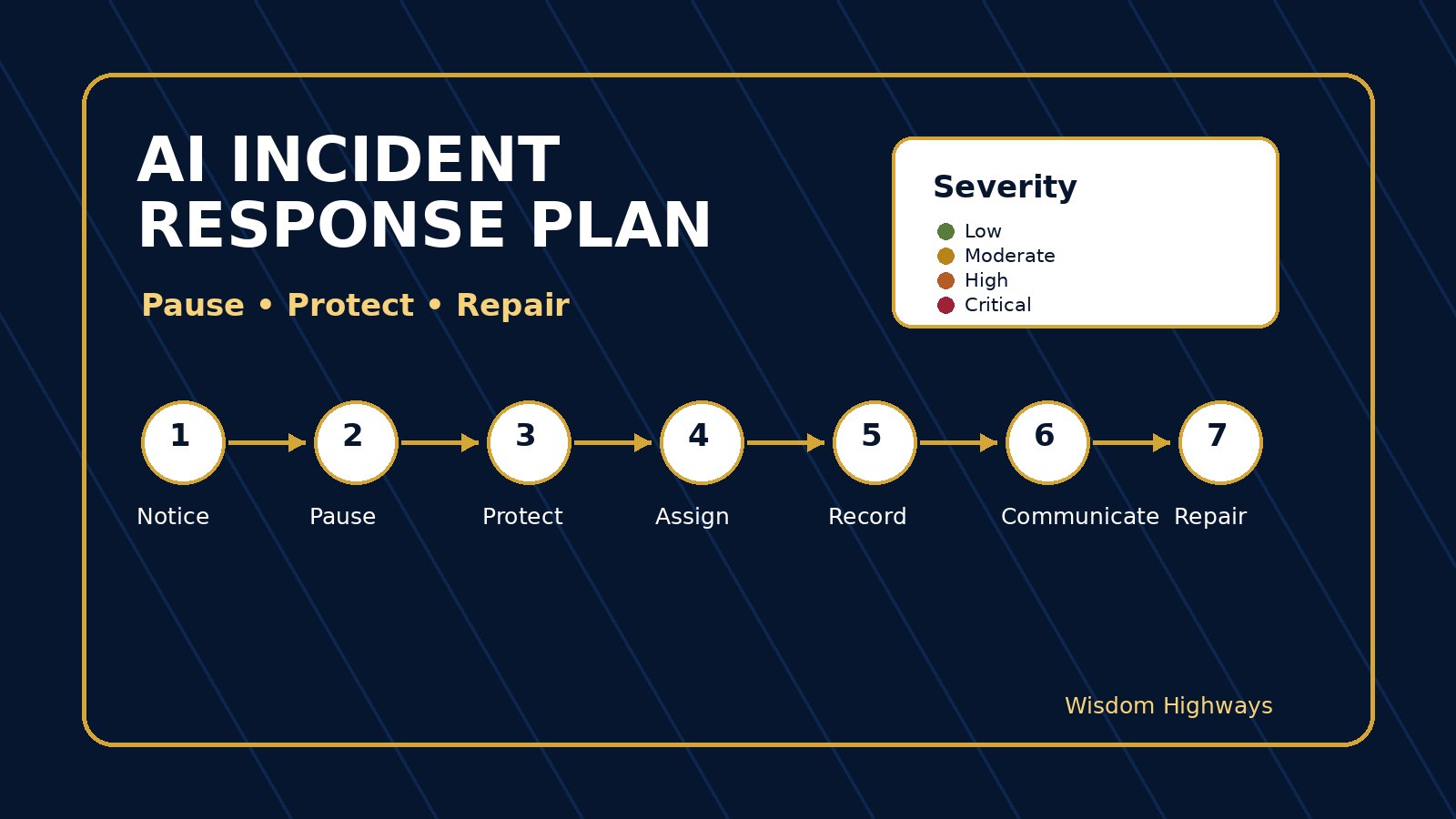
The WH seven-step AI incident response plan
Use this plan for any AI-related event that may affect accuracy, privacy, confidentiality, reputation, pastoral care, donor trust, customer outcomes, staff dignity, financial decisions or public communication.
1. Notice and name the incident
Someone must be allowed to say, “This may be an AI incident.” Do not wait until every fact is known. Name the concern early: wrong output, sensitive data exposure, unauthorized tool use, automated message error, misleading recommendation, hallucinated source, biased response, unsafe integration, or unclear decision influence.
For a church, this may be a staff member noticing that a prayer request was summarized too specifically. For a business, it may be a customer service lead seeing that an AI-generated reply promised something the company cannot deliver. Early naming keeps the issue small.
2. Pause the affected workflow
The first practical question is: what must stop right now? Pause the automation, hold the message, remove the draft from the publishing queue, disable the integration, restrict tool access, or stop using the output until a human owner reviews it.
This pause should be proportionate. Not every mistake requires shutting down all AI use. But if personal data, pastoral information, client trust, money, legal commitments, public claims or vulnerable people may be involved, pause first and review carefully.
3. Protect people and data
Ask what information, person or relationship could be harmed. Was personal data pasted into a tool? Did confidential information leave the organization? Did an AI output affect a decision about a person? Did a public message mislead people? Did a beneficiary, member, client, staff member or donor become identifiable?
This step is where wisdom matters. Treat people as people, not as “records.” If the incident touches sensitive pastoral, health, financial, HR, legal, donor or client information, escalate to the appropriate senior leader and qualified adviser. Do not turn this article into legal advice; use it as a trigger for proper review.
4. Assign one accountable response owner
AI incidents get messy when everyone is concerned but nobody is responsible. Name one response owner for the incident. That person coordinates facts, decisions, communication and follow-up. They do not have to solve everything alone, but they must keep the response moving.
In a small organization this may be the founder, operations lead, senior pastor, executive director or systems owner. In a larger organization it may be the data protection lead, IT/security lead, communications director or risk owner.
5. Record facts before opinions
Write down what is known: tool used, user or team, date and time, data involved, output produced, audience affected, whether anything was published or sent, who has access, and what immediate action was taken. Keep the tone factual and respectful.
Separate evidence from interpretation. “The tool produced a false citation” is evidence. “The team is careless” is interpretation. Wise leaders need facts first so they can correct the right system.
6. Communicate with the right people at the right level
Not every AI incident needs a public announcement. Some need an internal correction, a manager conversation or a client clarification. Others may require senior leadership, legal, data-protection, pastoral or board-level involvement. The response plan should define who must be informed for low, moderate, high and critical incidents.
A useful rule: communicate early enough to protect trust, but carefully enough not to exaggerate, speculate or expose more information. If people were affected, communicate with humility and clarity. If the facts are still being established, say so.
7. Repair the system before restarting
The final question is not merely, “Can we use the tool again?” The better question is, “What must change so this does not quietly repeat?” Possible fixes include a stronger review step, a better prompt template, a data-boundary rule, a permission change, staff training, a source-checking requirement, a safer tool configuration, a vendor review or a decision that this workflow should not be automated.
Do not restart a risky workflow just because the immediate pressure has passed. Restart when the owner can explain the fix.
A simple severity guide
- Low: inaccurate or awkward AI output caught before use; no sensitive data; no external impact.
- Moderate: internal confusion, minor external correction, unapproved tool use, or non-sensitive operational data entered into the wrong workflow.
- High: personal, pastoral, donor, client, HR, financial or confidential information involved; external communication may need correction; trust could be affected.
- Critical: possible legal/regulatory issue, serious harm, public reputational impact, vulnerable-person risk, financial loss, security compromise or repeated pattern after prior warnings.
Examples for pastors, nonprofits and SMEs
Church example: sensitive prayer information
A ministry assistant uses AI to turn prayer requests into a weekly summary. A draft includes enough detail that a family could be identified. The response owner pauses the message, removes identifying details, checks whether consent exists, informs the senior ministry leader and creates an anonymized prayer-summary template. The lesson is not “never use AI for writing.” The lesson is “never let sensitive pastoral material enter the workflow without a boundary.”
Nonprofit example: beneficiary dignity
A fundraiser uses AI to sharpen a beneficiary story. The tool makes the story more emotional and adds details that were never provided. The response owner holds the campaign, compares the draft with source material, removes invented details and updates the communications checklist: AI may improve clarity, but it may not add facts, identity details or emotional claims that were not approved.
SME example: wrong client promise
A sales team uses AI to draft a proposal email. The email promises a turnaround time the operations team cannot meet. The response owner contacts the client quickly, corrects the promise, reviews the prompt template and adds a rule that AI-generated commercial commitments require human approval before sending.
A 45-minute setup checklist
- List the AI workflows your team currently uses or is likely to use.
- Name one owner for AI incidents and one backup owner.
- Define low, moderate, high and critical severity in plain language.
- Decide which incidents require senior leadership, legal, data-protection, pastoral, board or client communication.
- Create a one-page incident form: what happened, tool used, data involved, people affected, action taken, owner, severity and system fix.
- Connect the plan to your AI decision-rights, ownership, data-boundary and exception-log systems.
- Run a tabletop exercise: “What would we do if an AI-assisted message exposed sensitive information?”
Common mistakes to avoid
Mistake 1: Treating AI incidents as only technical incidents. Many AI failures are trust, communication, governance or human-review failures.
Mistake 2: Waiting for certainty before pausing. If the workflow could harm people or trust, pause first and investigate.
Mistake 3: Blaming the nearest staff member. Some errors are careless. Many are system signals: unclear policy, unrealistic workload, poor training or a tool introduced without governance.
Mistake 4: Restarting without a fix. If the same workflow resumes unchanged, the organization has learned nothing.
Internal links for a stronger readiness system
An incident response plan should not stand alone. Use AI consent and data boundaries to decide what information may enter AI tools. Use an AI exception log to record near misses and rule overrides. Add an AI ownership register so every tool has a responsible human owner. Strengthen approval with an AI communication approval policy and an AI decision-rights matrix.
Wisdom Highways perspective
Wisdom before automation does not mean fear before innovation. It means leaders care enough about people to prepare for what could go wrong. A wise AI system has speed, but it also has brakes. It has creativity, but it also has correction. It has automation, but it also has accountable humans.
For Wisdom Highways, the goal is not to make organizations anxious about AI. The goal is to make them ready. When an AI incident response plan exists, your team can move faster with more confidence because everyone knows how to protect trust when the tool makes a mistake.
Related resources
- AI Exception Log
- AI Consent and Data Boundaries
- AI Communication Approval Policy
- AI Decision-Rights Matrix
Freshness note: This article was prepared in October 2026. Review quarterly as AI tools, privacy obligations, platform policies and incident-response expectations change.
Keep learning with Wisdom Highways. Follow our WhatsApp Channel for practical AI tips, time-saving ideas, product updates and selected offers.
Follow WH Premium AI Vault on WhatsApp